新智元 (微信公众号) · 10/11/2026, 12:25:00
Anthropic Launches Claude Managed Agents Beta: Dynamic Workflows Boost Bug Detection from 38% to 94% in Large Codebases
Anthropic has launched the public beta of Claude Managed Agents, enabling a primary agent to autonomously orchestrate sub-agents for parallel task execution. Benchmark tests on a 116k-line codebase with 70 embedded bugs revealed that single agents detected at most 27 bugs (~38%), whereas dynamic workflows consistently identified over 66 (>94%) across three runs. Simultaneously, Claude Code Projects expanded its beta access, reinforcing the efficacy of multi-agent collaboration for complex, long-horizon tasks.
SOURCE COVERAGEFull Original Report


The best single-agent run found 27 bugs.
Switch to Claude organizing its own team, running three times consecutively, and each run uncovered 66 bugs.
This is a set of test results just released by Anthropic: 70 bugs were pre-embedded in 116,000 lines of code, with both single agents and dynamic workflows each running three times.
The result? Working alone, the best performance still missed over 60% of the bugs; whereas working collaboratively as a team, all three runs detected more than 90%.
Comparison of bug detection results between single agents and dynamic workflows, as published by Anthropic.
Behind these results lies Claude’s ability to autonomously assign tasks and organize multi-agent collaboration.
On October 10, the public beta for Claude Managed Agents’ dynamic workflows launched.
With this feature, once the main agent receives a task, it can write its own orchestration script, arrange other agents to complete subtasks in stages, and finally aggregate the results.
On the same day, the public beta scope for Claude Code Projects was expanded: all Pro and Max users who had previously joined the waitlist now have access.
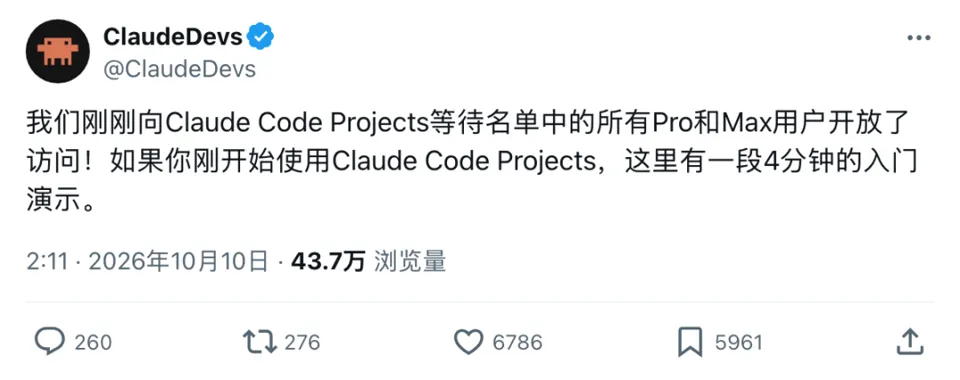
In Projects, you can continuously submit requirements around a specific project, while Claude handles task decomposition and coordinates multiple threads to progress in parallel.
One update enables developers to integrate multi-agent collaboration into their applications, while the other allows users to directly delegate work and track progress within project conversations.
Both updates point to the same shift: beyond executing tasks, Claude is also taking over responsibilities that previously required human oversight—such as assigning work, monitoring progress, and handing off results.
You define the goal
Claude assigns the work
Opening several AI windows simultaneously isn’t hard.
The trouble lies in re-explaining the context to each window, transferring findings from one side to another, and individually asking: How far along are we? Where are we stuck? What’s missing?
As the number of windows grows, humans end up busier acting as messengers.
Projects aims to take on this burden.
Within the same project conversation, you continuously submit requirements, and Claude decides whether to open a new task thread or route the request to an existing thread already handling related work.
Each thread can be understood as an independent working conversation advancing a specific task.
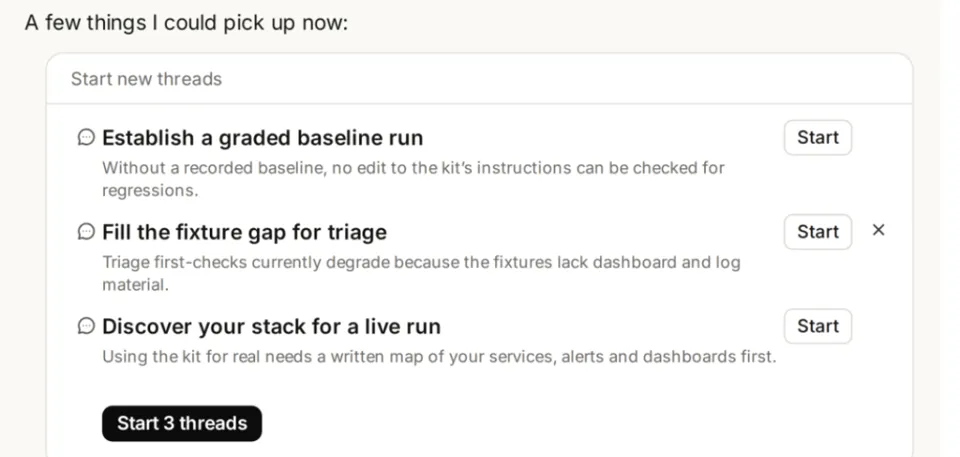
Projects coordinating conversations and task overview
Anthropic provided an example: deprecating old APIs across backend, web, and mobile clients simultaneously.
This involves multiple code repositories, where changes in different areas must coordinate with each other.
Claude can decompose tasks by repository, modify code separately, run tests, submit merge requests, and then inform you which changes need to be merged first.
Each cloud thread has its own context and code copy, works on its own branch, and reports results back to the project conversation.
You can still enter any thread to view details or correct the direction. The project overview lists tasks currently in progress, waiting for your input, or ready for review separately.
If you step away and return later, you don’t need to ask each window for status updates—you can pick up right where action is needed.
To save time on repetitive communication, previous instructions must be remembered.
Projects accumulates project memory.
Changes in requirements, decisions made, and pitfalls encountered can all be recorded for subsequent cloud threads to read.
Official examples of daily work scenarios include: noting that the release date moved to Friday, why a certain feature was cut, or who needs to be consulted before modifying a specific service—all such information can be stored in project memory.
The knowledge base also saves uploaded materials and files generated by Claude, allowing subsequent tasks to build upon existing outcomes.

New projects will accumulate project memory
The official documentation provides a concrete task example:
Review 300 contracts to identify which ones contain change-of-control clauses—provisions specifying how the contract is handled if the company’s control changes.
Reading each contract individually is already labor-intensive, and one must ensure every document is checked, conclusions are traceable, and any omissions can be promptly addressed.
Claude generates a workflow program for the task, orchestrating which Agents read the materials, how results are processed, and how subsequent steps proceed.
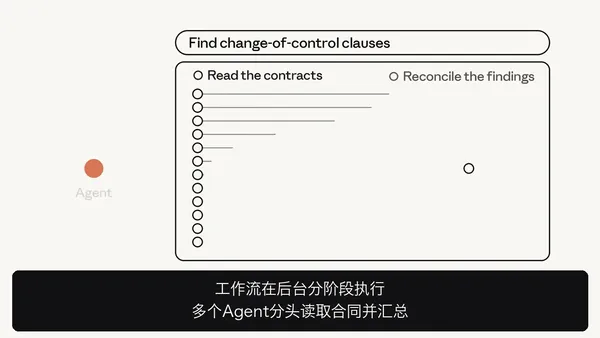
Contract reading tasks run in parallel, followed by verification and aggregation.
Role assignments and handoffs are encoded directly into the program, making it ready to execute.
Once an Agent finishes reading the materials, it passes the result to the program. The program then forwards the result to subsequent Agents or determines the next branch based on that output.
For tasks requiring iterative revisions, loops can also be incorporated into the workflow.
An example cited in the official documentation is manuscript proofreading: continuous revision until approval is granted or a preset number of rounds is reached.
In standard sub-Agent delegation, the main Agent must read reports and then decide the next step. Dynamic workflows, however, encode extensive intermediate handoffs into the program, allowing progress to occur in the background.
During wait times, the main Agent can still interact with the user and check progress. After execution completes, it reads the results to respond to the user or initiate the next round of work.
However, once threads within the workflow return their results, the main Agent cannot query the same thread further as it would with a standard sub-Agent. Therefore, verification and rework should ideally be planned into the workflow upfront.
The official sample instruction for contract review specifies:
In the first round, assign one Agent per contract; in the second round, have another Agent re-examine all contracts, including those where no target clauses were found in the first pass. If verification fails, perform rework and verify again.
This approach provides a second chance to catch clauses missed during the initial review.
Of course, the contract case illustrates the working method.
Anthropic did not disclose specific role divisions in the Bug testing post, so we cannot assume these 66 Bugs were identified using this exact process.
1000 Agents
Still Need Proper Orchestration
A maximum of 1000 Agents per single run is one of the most striking figures from this public beta.

This refers to the cumulative limit of up to 1000 Agents launched throughout the entire workflow execution.
Current documentation lists a concurrent thread limit of 64, though the official team notes this concurrency level may be adjusted.
Workflows can execute in batches or wait for results from previous stages before scheduling subsequent ones.
Each Agent maintains its own conversation history while sharing files and the sandbox environment (where code runs and materials are processed) within the session.
Developers can pre-configure specialized Agents or allow the workflow to define them dynamically based on task requirements.
To integrate, set the type to multiagent_20261001 in the multi-agent configuration, then specify the model, tools, and task requirements.
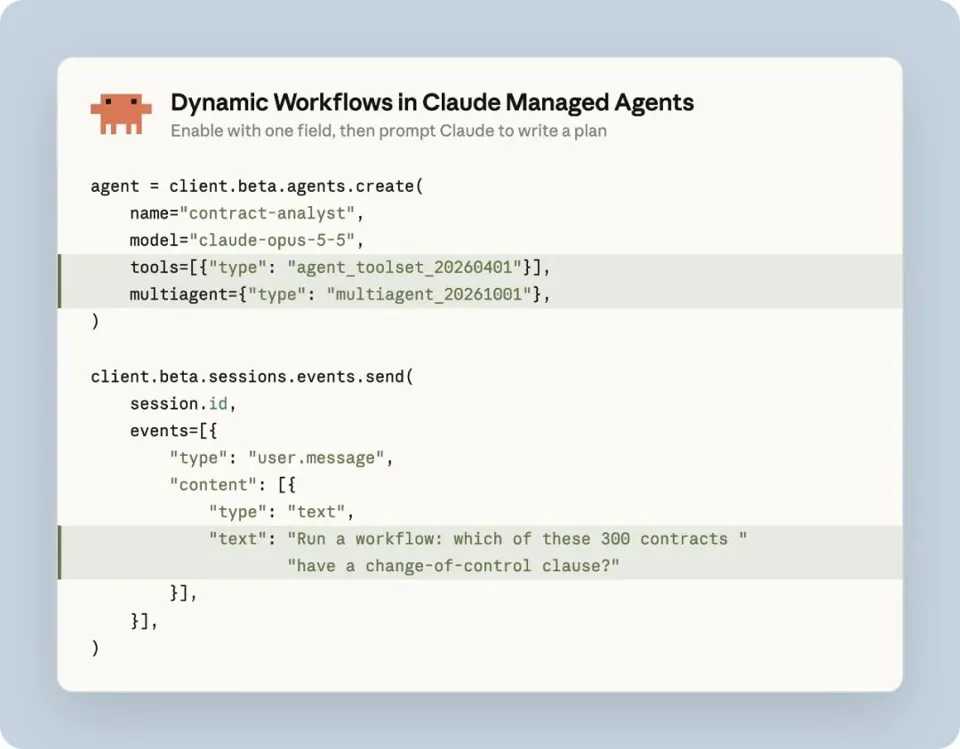
After enabling dynamic workflows, instruct Claude on the task, and it will generate a division-of-labor plan. The example shown involves screening 300 contracts for change-of-control clauses.
However, effective delegation isn't enough; incomplete areas must also be clearly defined.
One official instruction sample requires: if an Agent cannot read a contract, mark that contract as "uncovered" and continue with the remaining tasks.
"No issues found" and "not checked at all" must be distinguished. Otherwise, a neatly summarized report might easily hide gaps in task coverage.
Developers can inspect execution stages and individual thread logs to trace issues along the record.
Taking contract review as an example, developers can track stages like reading and verification, and view execution logs for each task thread.
With more Agents involved, both execution sequencing and visibility into completed versus pending tasks become critical.
It is important to distinguish: the limits of launching up to 1000 Agents and finding 66 Bugs across three runs refer specifically to Managed Agents dynamic workflows, not Projects.
Saving Coordination Time
While Costs Continue to Accumulate
Returning to the initial test: a single Agent found 14, 15, and 27 Bugs in three separate runs, whereas the dynamic workflow consistently found 66 Bugs across three runs.
More Bugs were identified, but the additional time and cost incurred remain unclear.
Official documentation has not disclosed the models used, actual Agent counts, duration, token usage, or false positive rates, making it difficult to determine yet whether this workflow is faster or more cost-effective.
In practical use, costs for the two features should be evaluated separately.
Projects utilize existing subscription quotas, with worker threads and coordination conversations consuming usage. The more parallel tasks there are, the faster the quota is depleted.
Users can adjust the model and reasoning intensity, or instruct Claude to spawn fewer threads. Typically, worker threads pause once they hit the plan's usage limits and resume when quotas reset.
Managed Agents are billed based on model token usage. Additionally, there is a runtime fee of $0.08 per session hour, which only accrues while the session is actively running.
The $0.08 charge covers only the runtime fee; tokens consumed by multi-agent reading materials and answer generation are billed separately.
Developers can set session budgets, with model consumption from workflows included in this cap. Execution pauses upon reaching the budget, but already-issued model requests will still complete, meaning final costs may exceed the budget.
Session budgets cover model consumption within dynamic workflows, facilitating cost control for multi-agent collaboration.
Therefore, official recommendations suggest starting with well-scoped tasks to gauge consumption before gradually increasing complexity.
More agents do not automatically equate to better cost-efficiency.
One must account for how many genuine issues are identified, the additional model call costs incurred, and the human time required for review and error correction—all part of the same equation.
If saving time on task allocation results in more cleanup work, the project may not finish any faster.
These two updates position Claude to take on more organizational responsibilities. Users define goals, budgets, and acceptance criteria, while Claude handles task distribution, progress tracking, and handoffs.
The upcoming challenge is: after delegating tasks, can Claude minimize human oversight and deliver results that withstand scrutiny?
References:
https://x.com/ClaudeDevs/status/2108591328732856655
https://x.com/ClaudeDevs/status/2108591330129523146
https://x.com/ClaudeDevs/status/2108591331660468538
Instant ASI Updates
⭐ Like, Share, and "Watching" – The One-Click Trio ⭐
Star us to lock in instant pushes from New Intelligence Era!