Stream Vessel Enhances MCP OAuth to Support Trusted Custom Client URIs
Stream Vessel addresses the MCP OAuth registration bottleneck where custom agents fail due to strict redirect URI allowlists. The new mechanism allows users to manually verify and trust non-predefined client callback addresses, enabling personal agents to securely access private storage like S3 without compromising anti-phishing security.
Full Report
Contents8 sections
The problem
You run your own agent: a Slack bot, a service on a VPS, an MCP client you wrote over a weekend. You want it on your files, which on Stream Vessel means your own S3 bucket, where an agent can read, write and delete through the MCP server. The agent speaks MCP’s standard OAuth sign-in: it registers itself, opens a browser, you click Approve, it gets a token.
It fails at step one. At registration the agent named its redirect URI, the address your browser returns to after you approve, carrying a one-time authorization code the agent swaps for a token. Yours is https://agent.yourhost.example/callback; the answer is invalid_redirect_uri. The server only accepts addresses on its operator’s allowlist: Claude, ChatGPT, Cursor, VS Code and a few others. Getting yours added means asking the operator to change a config file.
The server cannot simply accept any address. That list is the addresses the post office will deliver your house keys to. Without it, a stranger registers a fake “Claude” that has the keys sent to their place, and phishes your storage with one link. So the server is either closed to you or unsafe for everyone.
Both failures are common. On the closed side, this is what people run into:
“The redirect URI is not allowed, the URL is not part of Atlassian whitelisted domains for registered MCP Clients.” — an error users, Cursor’s among them, reported in the Atlassian developer community
“…each host application must have a registered GitHub App (or OAuth App) to authenticate on behalf of the user.” — GitHub MCP server, policies and governance; otherwise you fall back to a personal access token
On the open side, a May 2026 study that tested 119 OAuth-enabled MCP servers found registration endpoints on 114 of them, 95.8%, that
“accept arbitrary redirect_uri values from anonymous requesters.”
The attack: one link, one click, someone else’s bucket
Say your server accepts any registration and any redirect address. An attacker with no account on it can take over a user’s access in four steps:
- Register a client named “Claude” whose redirect URI is
https://evil.example/cb. Open registration is anonymous, by design. - Send a signed-in user a normal-looking
/oauth/authorizelink: “Reconnect your storage to Claude”. - The user sees your real consent screen, on your real domain, in their real session, and clicks Approve.
- The code lands at
evil.example. The attacker trades it for a token and is now the user.
PKCE does not help: it lets only the client that started a flow finish it, and the attacker started this one. The client name is self-declared and proves nothing. The consent screen shows the redirect host, but claude-connect.app passes a glance. It is the same trick as the fake-app approval prompts sent to Microsoft 365 users: a real page and a real Approve; there the attacker uses an app the platform registered, here an address the server should never have accepted.
The user does approve, but on false information. A redirect allowlist is what makes an approval mean what the user thinks it means: whatever the name says, the keys can only go where the list says.
This is not hypothetical. In January 2026 Obsidian Security reported this chain against Square’s MCP server: self-registration accepted any redirect address, and one click exposed a merchant’s profile, transactions and bank details. In the researchers’ words, “any user who had previously authorized the Square MCP server was vulnerable.” Square’s fix, they note, only applied to newly registered clients.
Others found the same chain on an MCP proxy in front of a company’s single sign-on, worth a 24-hour access token and a 14-day refresh token per click, and across bug-bounty programs, where it was sometimes waved off as social engineering. SickSec’s answer: the victim never leaves the trusted domain.
A quieter problem rides along. When a request fails a check after its redirect address was accepted, the error is sent to that address. So a server that accepts any address is an open redirector on its own domain: a crafted authorize link with a bad scope bounces visitors to any site, under your hostname. RFC 9700 describes exactly this case.
What the spec says, and what servers actually do
The MCP spec names the risk and leaves the policy to each server. Its security considerations say authorization servers MUST validate exact redirect URIs, SHOULD only redirect automatically to a URI they trust, and MAY instead inform the user and let them decide. The last two are RFC 9700’s sentences, word for word. What “trust” means is left open.
Registration is shifting too. The 2026-07-28 client registration page deprecates Dynamic Client Registration (a client registering itself over an API, no human involved) for Client ID Metadata Documents (CIMD), where the client id is an HTTPS URL to a document listing its redirect URIs. CIMD says who publishes a client, not whether this user meant to connect it.
The OAuth working group has been here. In a December 2025 thread on the IETF OAuth list, Warren Parad argued that unauthenticated registration turns an MCP authorization server into an open redirector. Aaron Parecki’s quoted reply points to RFC 9700 §4.11.2, which starts from exactly that setup.
In practice, servers sit at one of two poles:
| Approach | Example | Who can connect | Phishing exposure |
|---|---|---|---|
| Fixed allowlist, set by the operator | pgEdge Postgres MCP server: self-registration is on, but the registered URI must be on its list (Claude’s callback and two loopback URIs by default) | Only listed clients; anything else needs a config change | Low |
| Whatever the client registered | 114 of the 119 servers tested in the May 2026 study | Any client | High: the attack above |
Loopback means localhost or 127.0.0.1: an app on the user’s own machine, waiting for the browser to come back.
The first pole costs real users, and clients will not fix it for you. A Claude Code issue from June 2026 reports that organizations with exact-match redirect allowlists cannot sign in from Claude Code, because its http://localhost:<port>/callback host and path are fixed. It was closed as not planned in July 2026. The server has to move.
This is not a new idea
Letting users vouch for their own app’s callback is old. GitHub has developers create an OAuth app and type in its callback URL. The MCP spec’s pre-registration option describes a server page where users register a client by hand. And an organization can add trusted redirect domains to Atlassian’s MCP server. None of these fit a client that registers itself anonymously: the first two need a client id made somewhere else, and Atlassian decides for a whole organization. So we kept self-registration and let each user decide at sign-in, for their own account, beside the server-wide list.
Our design: trust is per user, decided at sign-in
We keep the operator’s allowlist and loopback for local clients, unchanged and open to every account. On top of it, each user can trust a handful of exact https redirect addresses for their own account; ours caps at 10. On Stream Vessel that is “Trusted app addresses” on the MCP page of the web app.
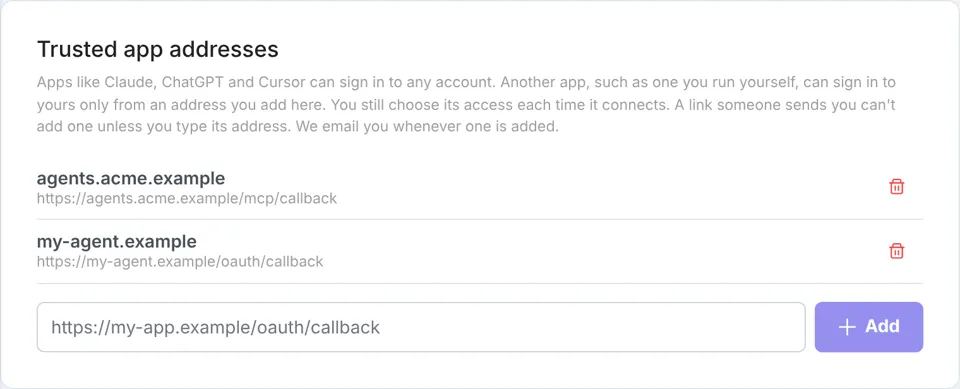
The list lives on the MCP page, and only the user's own browser session can change it.
The key move is when the check runs. Registration happens before anyone signs in, so it cannot know whose list to consult. So registration accepts any https URI, and the decision waits for the authorize page, where the user is known:
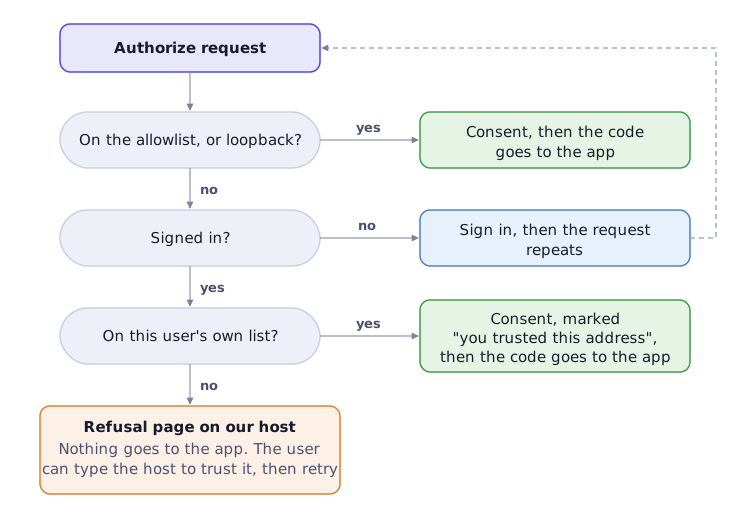
A code reaches only an address every account or this user trusts.
One rule sits under every branch: no code and no error is ever redirected to an address unless every account or this user trusts it. Before sign-in no user’s list applies, so even the OAuth library’s own validation errors (a bad PKCE challenge, an unknown scope) wait for sign-in, and a refusal is a page on our host. That closes the open-redirect hole along with the phishing one, and it covers the Deny button too: n8n’s CVE-2026-42230 (April 2026) sent users who denied consent straight to an attacker’s registered address.
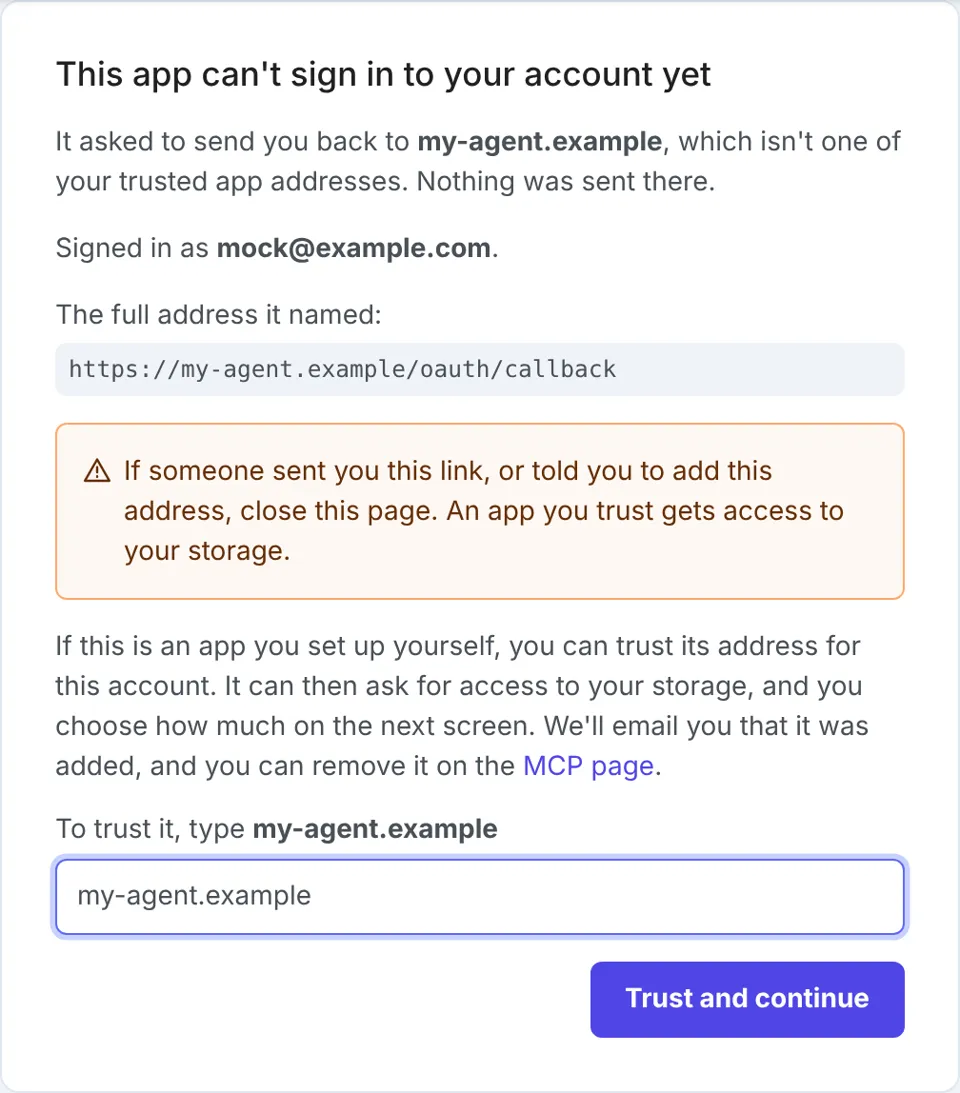
The refusal page. Nothing went to the app; trusting it takes typing the host.
Seven ways around it, each closed
Most of these rules came from trying to break the first version.
- Only the user’s own browser session changes the list, never an app or API token, so a stolen token cannot widen where the user’s codes may go.
- Adding from the refusal page means typing the host. The page shows the host, the full address as plain text (never a link), the account it would join, and a warning: if someone sent you this link, close the page. “Trust and continue” stays disabled until the host is typed, so one click from a phishing email is not enough.
- The consent screen names this sign-in’s redirect, and why it is allowed. A client can register several addresses at once, so it could list
claude.aibeside its own. The screen shows only the one this sign-in returns to, and its basis: on the allowlist, loopback, or “you trusted this address yourself on 3 Nov 2026”. The spec requires showing the host for metadata-document clients, though the May 2026 study found 60.5% of tested servers don’t; the basis is what makes it mean something. - Every addition is emailed, and audited while the activity log is on. The email leads with the host, says when and to which account, and keeps the full address from turning into a link. It is the signal a phished user would otherwise never get.
- Removing an address cuts the app off, even mid-sign-in. It revokes every grant (an approval the user gave) through that address and drops codes approved but not yet exchanged. A code lives about a minute; without this, a code in flight becomes a grant after the removal.
- Hosts the browser and the server read differently are refused. A URI parser may keep
good.example%2eevil.exampleas one literal host while the browser goes togood.example.evil.example. A page that names one host and sends the user to another defeats the typed-host check, so such hosts are refused at registration and on the list. - Exact match only. No wildcards, no prefix match, no loopback-style port flexibility.
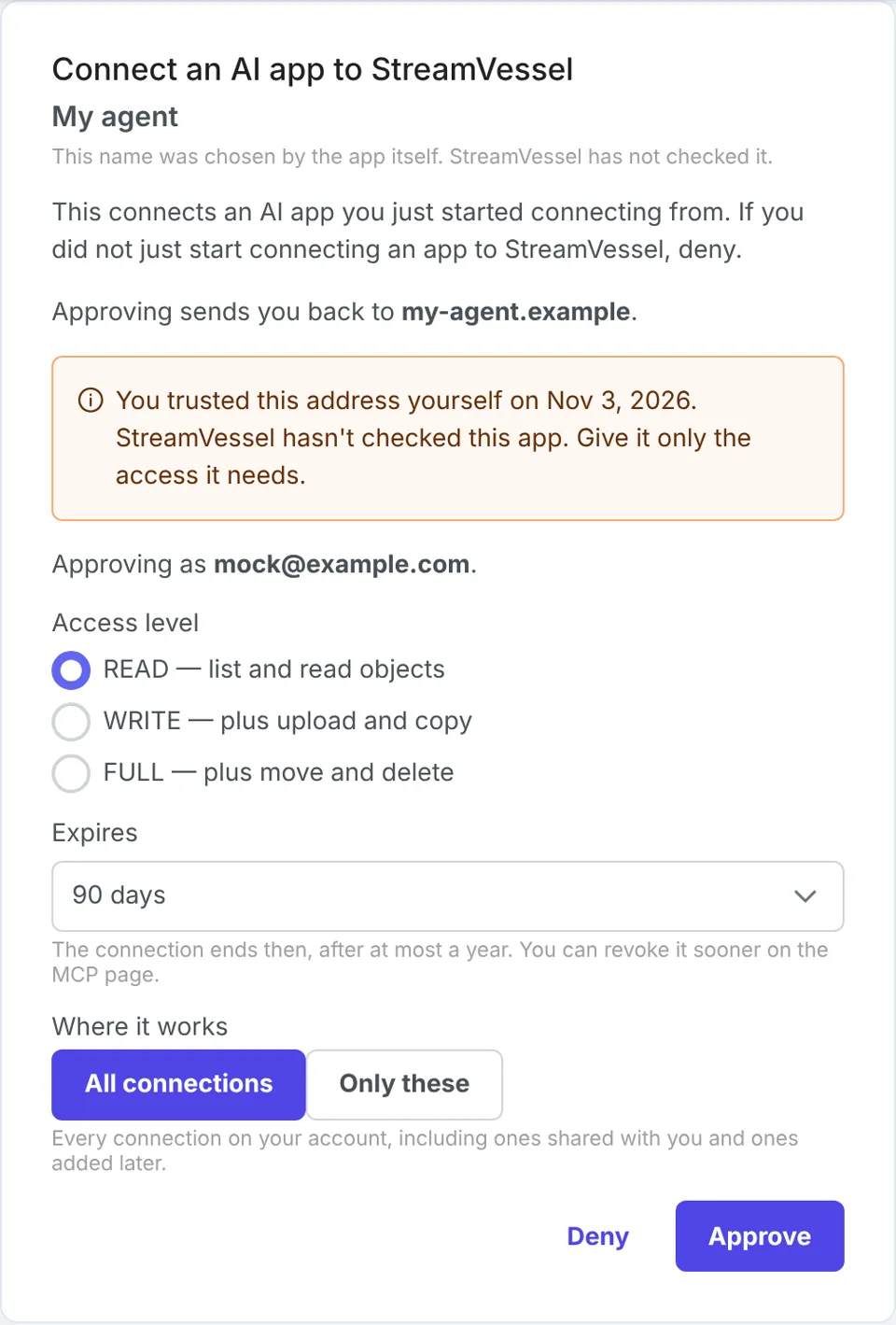
Consent through a trusted address: this sign-in's host, why it is allowed, and read-only selected by default.
What it does not stop, and what we turned down
It does not stop a determined social engineer: a user talked into typing an attacker’s host and approving is phished, whichever tier they pick. We bound it rather than prevent it: the typed host, the warnings, the email, instant disconnection on removal, and a consent screen that starts at read-only and says the user trusted the address.
We first capped user-trusted addresses at write access, so a phished grant could change data but not delete it. We dropped the cap: users connecting their own agents wanted full access, and the cap was a backstop, not the defense.
Beyond the two poles above, we weighed:
| Option | Why not on its own |
|---|---|
| CIMD domain binding (redirect host must match the client id’s host) | Proves who publishes the client, not that this user meant to connect it; a malicious domain can still ask |
| “Unverified client” tier with a lower ceiling | Still one click from a phishing link, at a smaller blast radius |
| Per-user list (shipped) | Needs the user’s own session to add; costs a typed host once per app |
A checklist for your own MCP server
- Decide where codes may go at authorize, with the signed-in user known, not at registration.
- Check every answer, errors included, against that rule before redirecting, and refuse to a page on your own host. Do it at authorize, not only at token exchange: Cloudflare’s
workers-oauth-providershipped CVE-2025-4143 in May 2025 for checking only the latter. - Show the redirect host of this request on the consent screen, and say why it is allowed.
- Make widening the list a deliberate act outside the sign-in flow, or behind a typed confirmation.
- Email the user every time an address is added.
- Make removal revoke grants and in-flight codes.
- Refuse URIs whose host the browser and your parser read differently.
Want to try it? In your own agent, add Stream Vessel’s MCP server, https://mcp.streamvessel.com, and sign in. If your agent isn’t on our list, you’ll land on the refusal page shown above, where you can trust its address and carry on.