Fleetlayer Launches Open Framework for Multi-Machine AI Agents
Fleetlayer is an open-source orchestration framework that links Claude Code and Codex sessions across laptops, home servers and VPS instances under every account a user holds. Agents can message each other, share signed-in browsers and files, and operate under user-defined rules, approvals and audit logs, with source available on GitHub.
Related Entities
Full Report
Contents21 sections
Claude Code is awesome, until you add a second machine or account.
Fleetlayer connects the Claude Code and Codex sessions on your laptop, home server and VPS, under every account you use. They message each other, share your signed-in browser and files, and work under rules you set, on machines you control.
Install FleetlayerRead the source on GitHubfleetlayer fleetexample
$ fleetlayer fleet
laptop (macbook, online)
  api@laptop        claude  working  Fixed the flaky upload test.
  docs@laptop       codex   idle     Install guide rewritten.
mail (home-server, online)
  triage@mail       claude  idle     3 emails need your reply.
home (home-server, online)
  infra@home        claude  working  Backup check passed.

$ fleetlayer msg send --to api@laptop "the staging deploy is done"
Delivered to api@laptop (claude-code).
What starts going wrong
One Claude account on one machine is easy. Add a second account, a server, or another kind of agent, and this starts happening:
- claude.ai artifacts say “access denied” unless you’re signed in to the right account.
- A session on your server can’t message one on your laptop.
- You keep signing in and out of the Claude in Chrome extension.
- An agent on your server can’t use the browser on your Mac.
- An agent on your server can’t reach the Downloads or Screenshots folders on your Mac.
- Codex and Gemini agents can’t make claude.ai artifacts at all.
- You find out an account is out of usage when a session stops.
Fleetlayer solves all of this, and much more
- ✕ “access denied” on artifacts
Fleetlayer Pages and Apps
Claude, Codex and Gemini agents write pages and interactive apps as plain folders, and Fleetlayer hosts them behind one sign-in.
- ✕ sessions that can’t reach each other
Messages between any two agents
Claude or Codex, on the same machine or another one: fleetlayer msg send --to api@laptop.
- ✕ signing the extension in and out
Any agent can control your browser
Agents on any machine and any Claude account can use the Chrome on your Mac, signed in as you (via Playwright MCP).
- ✕ an account that runs out mid-task
Your own accounts, on your own machines
Year-long sign-ins for each of your Claude accounts on every machine you run, and each account’s usage visible to every session.
You need this if
- your agents run on more than one machine, or under more than one Claude account;
- you run Codex or other agents next to Claude Code;
- an agent reads email or the web, and you want it kept away from the others' rights and secrets;
- you want your agents, secrets and the record of what they did on machines you control.
You probably don't if
You use one Claude account on one laptop, and Claude Code's own features cover the rest. Use those, and come back when you add a second machine or account. What Fleetlayer adds beyond Claude Code.
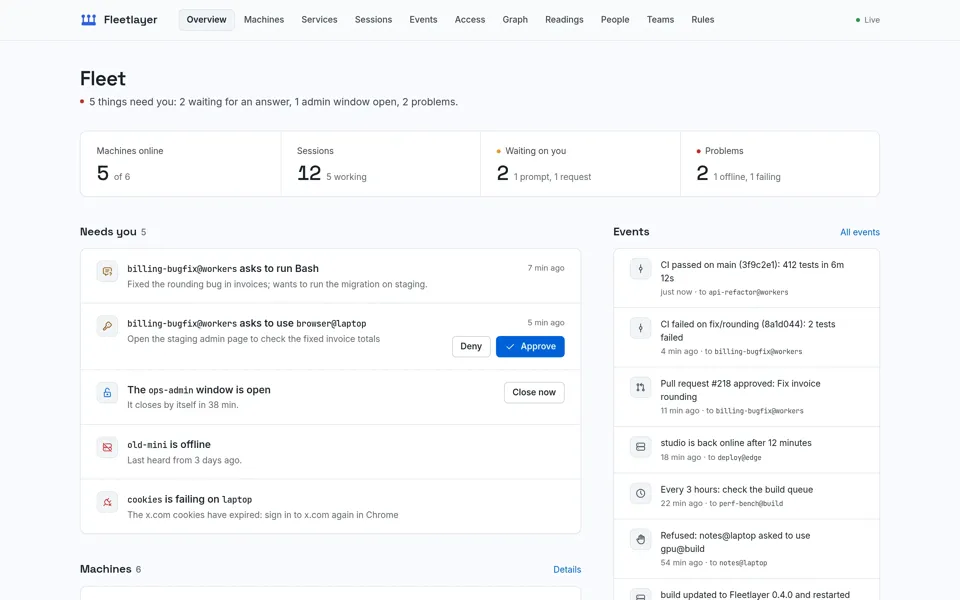
Your whole fleet on one page.
The dashboard shows every machine and what it runs, every agent session and whether it's waiting on you, the events that arrived and which agent each reached, and the requests waiting for your approval. Live, behind your own sign-in, and everything on it works from the command line too.
A node on each machine, one control plane.
Fleetlayer attaches to herdr without taking it over, so its app and your terminals keep working as before. Each machine, or each Unix user, runs a small node that keeps one outbound connection to the control plane, so it works behind NAT with no ports to open.
- Laptop
herdr
- api
- docs
- review
node
delivers messages, runs plugins 2. Home server
user triage
- triage
reads strangers' email, so it may message only you
user infra
- infra
- backups
a node per user
own key, own rules 3. VPS or the same laptop
control plane
machines, sessions, messages, webhooks, access rules
pages · sign-in · Claude accounts
each one a separate piece you can move
one outbound connection per nodeSession managerherdr today, others to comeNodeone per machine or Unix userServicerun it anywhere, move it later
What you get
-
Every session in one list
Every machine and session, with a one-line summary of what each agent is doing, and a searchable record of what it did. fleetlayer attach api@laptop watches or drives its terminal from anywhere.
-
Agents that message each other
On one machine or across machines, delivered through the agent's own channel and labelled with who sent it. A misspelt name suggests the right one.
-
Webhooks that find the right agent
A CI failure goes to the session that wrote the branch, which already knows the code, instead of waking a fresh agent with no context.
-
Your own accounts, on your own machines
Each of your Claude accounts' usage, visible to every session. Year-long tokens reach each machine sealed to its own key. Your sign-ins stay on a machine you control.
-
Separate users, separate rules
Run several nodes and herdr instances on the same machine or VM, each under its own Unix user. The access policy limits whom each agent may message and what it may use.
-
Tools that live on one machine
Your signed-in browser on the laptop, used by an agent on the server: fleetlayer mcp browser@laptop, limited to the callers you allow.
All the security, none of the pain
Most people run Claude Code with access to everything and hope nothing goes wrong. That works until an agent reads a malicious email, or a stray rm -rf runs in the wrong folder. Fleetlayer gives you the protections a security team would ask for, an agent sets them up for you, and each one can be switched off when you don't need it.
-
Ask before the risky things
Access rules decide which agent may message, start or take over which session. Anything sensitive waits for your approval, and you can leave approvals off for the work you trust.
-
Everything on the record
An audit log shows who did what and when, and you can check it hasn't been altered.
-
Secrets stay on your machines
Tokens travel encrypted to the machine that needs them, and the control plane never stores them.
-
Untrusted input stays untrusted
Messages from an agent that reads email or the web arrive marked as outside data. That agent runs as its own user and can't borrow a trusted agent's rights.
-
One sign-in, one sign-out
One sign-in for your self-hosted services, and signing out of one signs you out of all of them.
-
Secrets per role
Items from 1Password reach only the roles you grant them to, and are scrubbed from everything that leaves a machine. How
-
Agents reach only the hosts they need
Each role gets a list of hosts, and you approve new ones. Linux for now.How
-
An admin role that's off until you start a timed window
The agent that can change everything has no rights until then, and is cleaned up when the window ends.How
A foundation for your own agent workflows
Fleetlayer started inside Quietdeck. Once we saw how useful that layer was on its own, we pulled it out into its own project and refined it. It gives you the primitives to build your own apps and layers on top:
- sessions at
tab@node - messages
- webhooks and channels
- access rules
- approvals
- an audit log
- plugins in any language
- shared MCP tools
- pages and apps
Built on Fleetlayer
Quietdeck
An agent triages your email and proposes what to do, and you approve. Quietdeck is designed to run on Fleetlayer and uses its features to:
- forward emails and notifications to the agent that owns the work through Fleetlayer’s messaging
- know what all your agents are doing from Fleetlayer’s session summaries, and route each message to the right agent
- start an isolated email triage agent on its own Unix user, connected through its own Fleetlayer node, with access rules that limit whom it may message
One system, many parts
Fleetlayer is the layer between your agents and the tools around them. Each part does one job and can be replaced.
- AgentsClaude Code, Codex, Gemini
- Sessionsherdr
- Fleetlayercross-agent messaging, webhooks, single sign-on, access rules, approvals, audit log, remote terminals
- Fleetlayer Pluginsherdr, Claude Code, AI account management, session summaries, file sync, shared folders, pages and apps (all optional)
- ToolsExecutor for MCP servers and sign-ins to your services
- Secrets1Password
- BrowserPlaywright MCP
- FilesSyncthing, Obsidian Sync, Obsidian LiveSync, or any file syncing solution
- NetworkTailscale, Cloudflare Tunnel
- ServicesGatus for health checks, Traefik for addresses
- Backupsrestic
- Mobileherdr-mobile-relay
Start small, replace any component as you go.
Begin with everything on your laptop. When you outgrow it, move one piece to a home server or a VPS, or swap it for the tool you'd rather use: your own proxy, your company's sign-in, another session manager. Each piece keeps its state in one folder and speaks open protocols, so moving it is a copy and a new address.
Ask your agent
Set up Fleetlayer on this machine. The docs are at https://fleetlayer.ai/llms.txtOr run it yourself (Linux or macOS)
$ curl -fsSL https://raw.githubusercontent.com/fleetlayer/fleetlayer/main/install.sh | shStart everything on this machine
$ fleetlayer up
Fleetlayer is running. Status: http://fleetlayer.localhost:7680
$ fleetlayer sessions
No vendor lock-in
Your own stack instead of a vendor's cloud. Unlike one big app, Fleetlayer is a few separate pieces that work with the tools you already use, and you can swap any of them.
Keep using Anthropic's and OpenAI's own features for as long as they serve you. When you outgrow them (several subscriptions, several machines, agents from more than one vendor), you give nothing up. When a vendor ships its own version of a feature, Fleetlayer can support it too, and you can still change models and harnesses whenever you like.
For people who run many agents
Fleetlayer is for a person running many agents across several machines and accounts: personal errands, email triage, product work, infrastructure, background workers, each with its own machine or Unix user and its own permissions, all visible from your own terminal.
It grows with you. A household or a team shares one system, and a company gets what it needs (single sign-on, teams, separate organisations, audit) when it needs it.
Features
- Every session on every machine in one list, with what each agent is doing
- Messages between any two agents, Claude Code or Codex, on any machine
- Sessions started, resumed, answered and handed off on any machine
- A summary of each hour of every session
- CI results to the agent that pushed, through webhooks
- The dashboard: machines, sessions, events and approvals, live
- Every machine on your phone, through one herdr relay
- Your own Claude accounts on every machine, with each account's usage
- Your signed-in browser, for agents on any machine
- Your Mac's screenshots and downloads, for agents anywhere
- Approved commands that run on another machine
- Executor's MCP tools, with each call checked by your policy
- Pages and apps your agents publish, behind one sign-in
- Prompts sent to a session on a schedule
- Matrix rooms as channels agents hear and answer
- Leases, so many agents can share a few build machines
- Notes, skills and instructions kept the same on every machine
- Access rules, approvals and a tamper-evident audit log
- Agents that read strangers' text, kept in a Unix user of their own
- Secrets per role from 1Password, scrubbed from what leaves a machine
- Network access per role, with approvals for new hosts (Linux)
- An admin role that's off until you start a timed window
- One passkey sign-in for your services, with single sign-on and teams
- Your browser's cookies for command-line tools on other machines
- herdr and Rex as session managers
- Everything on one laptop with
fleetlayer up - Any piece moved to another machine with one command
- Signed releases that update every node themselves
- Heartbeats and health checks for everything in the background
- A production-grade server set up by an agent, from an example
Coming soon
- tmux as a session manager (v0.4.2)
- More harnesses: Cursor, OpenCode, Aider, pi and Gemini CLI
- SAML sign-in providers
Expect breaking changes: what changed in each release is in the changelog. Will it cost money? We might provide a hosted control plane and provision a VPS where you can run your remote agents and services, but we haven't decided on anything yet.
作者发帖说明(HN):
Hi HN! I ran into many problems when I started running lots of Claude Code sessions in parallel. I quickly ran out of usage, so I signed up for more Claude subs (which Anthropic terms allow.)
Running so many different accounts meant that I couldn't use claude.ai artifacts anymore, because the browser has to be signed in to the same account in order to access them. It's a pain to keep signing in and out of accounts. This also broke the Claude in Chrome extension because that can also only be signed into a single account.
Then I needed to manage AI agents that run on my laptop, a VM on my laptop, and multiple VMs on my home server. Claude Code has a messaging feature which is very useful, but agents can't see each other when they run on different machines. The Claude in Chrome extension only works for agents running on the same machine, so my remote agents couldn't help me with anything in the browser. It's really handy when they can access services that I'm already signed into.
I set out to solve all of these problems and I ended up building Fleetlayer. It's a control plane and a node binary that you run on all your machines and VMs to connect them all together. It connects to Herdr (and other session managers soon), and it makes it possible for all your AI agents to message each other and access tools and resources on other machines (with permission.)
It has a lot more features too: routing webhooks to agents, single sign-on, access rules, approvals, audit logs, remote te...