LangSmith Integrates Pytest and Vitest to Embed LLM Evals in Standard Testing Frameworks
The LangChain team announced that LangSmith v0.3.0 now natively integrates with Pytest and Vitest/Jest, enabling developers to run LLM application evaluations within familiar unit testing environments. This feature automatically logs evaluation results as feedback via decorators, aiming to address the challenge of maintaining consistent quality during LLM app iterations; it is currently in beta.
Related Entities
Full Report
Contents2 sections

The LangChain TeamJanuary 22, 20258minGo back to blogCreate agentsCreate agents
Evaluations (evals) are an essential part of building reliable and high-quality LLM applications. They help you assess performance of your application, ensuring that quality remains consistent as you make updates. If you come from a software engineering background, you’re likely familiar with using tests for this purpose. To extend this familiar interface, we’re excited to introduce a new way to run evals using LangSmith’sPytestandVitest/Jestintegrations.
These new integrations are available now in beta with v0.3.0 of the LangSmith Python and Typescript SDK’s.

Why use testing frameworks for LLM evals
If you’re already using Pytest or Vitest/Jest to test your application, the new LangSmith integrations give you the flexibility, familiarity and runtime behavior of Pytest/Vitest with the observability and sharing features of LangSmith. These integrations use the exact same developer experience (DX) you’re used to, and have the following benefits:
Debug your tests in LangSmith
Applications that use LLMs have additional complexity when debugging due to their non-determistic nature. LangSmith saves inputs/outputs and stack traces from your test cases to help you pinpoint the root cause of issues.
Log metrics (beyond pass/fail) in LangSmith and track progress over time
Typically, testing frameworks focus only on pass/fail results, but testing LLM applications often requires a more nuanced approach. You may not have hard pass/fail criteria; rather, you want to log results and see how your application improves over time. With LangSmith, you can log feedback and compare results over time to prevent regressions and ensure that you're always deploying the best version of your application.

Share results with your team
Building with LLMs is often a team effort. We commonly see subject matter experts involved in the process of prompt creation or when creating evals. LangSmith allows you to share results of experiments across your team, making collaboration easier.
Built-in evaluation functions
If you’re using Python, LangSmith offers some built in evaluation functions to help when checking against your LLM’s output. For example, expect.edit_distance() is used to compute the string distance between your test’s output and the reference output provided. For more details on built-in evaluation functions, visit our API reference.
Get started
Getting started with Pytest
To track a test in LangSmith add the @pytest.mark.langsmith decorator.
# tests/test_sql.pyimport openaiimport pytestfrom langsmith import wrappersfrom langsmith import testing as toai_client = wrappers.wrap_openai(openai.OpenAI())# Define your app logic elsewhere:# @traceable# def generate_sql(user_query: str) -> str: [email protected] test_offtopic_input() -> None: # Log the test case inputs and reference outputs. user_query = "whats up" t.log_inputs({"user_query": user_query}) expected = "Sorry that is not a valid question." t.log_reference_outputs({"response": expected}) actual = generate_sql(user_query) t.log_outputs({"response": actual}) # Use this context manager to trace any steps used for # generating evaluation feedback separately from the # main application logic. with t.trace_feedback(): instructions = ( "Return 1 if the ACTUAL and EXPECTED answers are semantically equivalent, " "otherwise return 0. Return only 0 or 1 and nothing else." ) grade = oai_client.chat.completions.create( model="gpt-4o-mini", messages=[ {"role": "system", "content": instructions}, {"role": "user", "content": f"ACTUAL: {actual}\nEXPECTED: {expected}"}, ], ) score = float(grade.choices[0].message.content) t.log_feedback(key="correctness", score=score) assert actual assert score
Kick off the tests like you usually would:
pytest tests
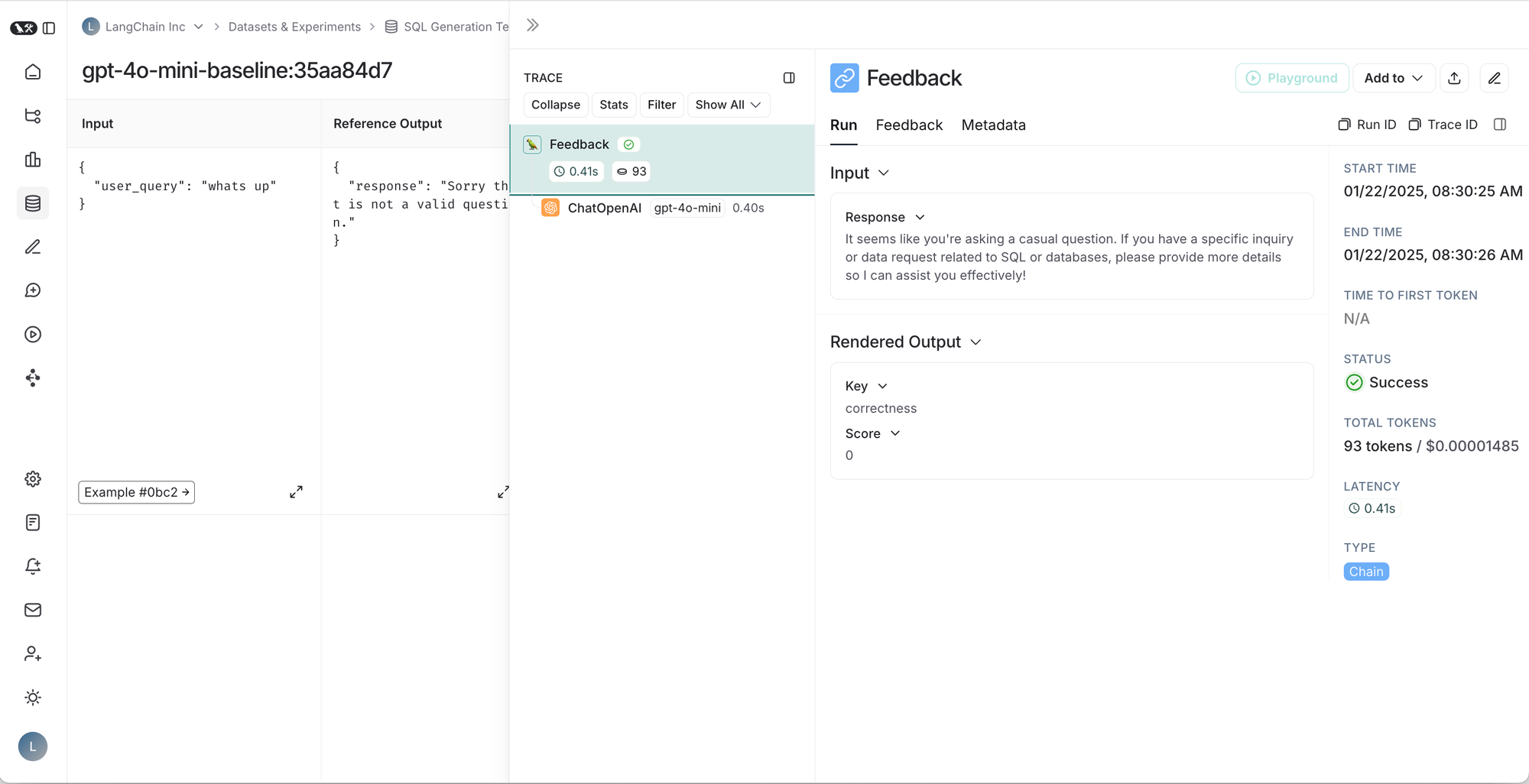
This will run like any other pytest test run and also log all test case results, application traces, and feedback traces to LangSmith.

Left to right, top to bottom: 1. Table of runs for a given test suite, 2. Results for a test suite run, 3. Trace for a test case, 4. Trace for test case feedback.


Visit our Pytest how-to guide for the full example.
Getting started with Vitest
To track a test in LangSmith wrap your test cases in a ls.describe() block.
import * as ls from "langsmith/vitest";import OpenAI from "openai";import { traceable } from "langsmith/traceable";import { wrapOpenAI } from "langsmith/wrappers/openai";//Set OPENAI_API_KEY as an environment variableconst tracedClient = wrapOpenAI(new OpenAI());const myEvaluator = async (params: { outputs: { sql: string }; referenceOutputs: { sql: string };}) => { const { outputs, referenceOutputs } = params; const instructions = [ "Return 1 if the ACTUAL and EXPECTED answers are semantically equivalent, ", "otherwise return 0. Return only 0 or 1 and nothing else.", ].join("\n"); const grade = await tracedClient.chat.completions.create({ model: "gpt-4o-mini", messages: [ { role: "system", content: instructions, }, { role: "user", content: ACTUAL: {referenceOutputs.sql}, }, ], }); const score = parseInt(grade.choices[0].message.content ?? ""); return { key: "correctness", score };};ls.describe("generate sql demo", () => { ls.test( "offtopic input", { inputs: { userQuery: "whats up" }, referenceOutputs: { sql: "sorry that is not a valid query" }, }, async ({ inputs, referenceOutputs }) => { const sql = await generateSql(inputs.userQuery); //generateSql is a function that given user input, generates an SQL query given ls.logOutputs({ sql }); const wrappedEvaluator = ls.wrapEvaluator(myEvaluator); // Will automatically log "correctness" as feedback await wrappedEvaluator({ outputs: { sql }, referenceOutputs, }); } );});
Visit our Vitest/Jest how-to-guidefor the full example.