Tutorial: Convert Transformers to ONNX with Hugging Face Optimum
This guide explains how to use the Hugging Face Optimum library to export Transformer models trained in PyTorch or TensorFlow into ONNX format. The process aims to optimize production deployment by enabling efficient execution on specialized runtimes and hardware.
Related Entities
Full Report
Contents9 sections
Convert Transformers to ONNX with Hugging Face Optimum
Published June 22, 2022 Update on GitHub Upvote 10
Hundreds of Transformers experiments and models are uploaded to the Hugging Face Hub every single day. Machine learning engineers and students conducting those experiments use a variety of frameworks like PyTorch, TensorFlow/Keras, or others. These models are already used by thousands of companies and form the foundation of AI-powered products.
If you deploy Transformers models in production environments, we recommend exporting them first into a serialized format that can be loaded, optimized, and executed on specialized runtimes and hardware.
In this guide, you'll learn about:
- What is ONNX?
- What is Hugging Face Optimum?
- What Transformers architectures are supported?
- How can I convert a Transformers model (BERT) to ONNX?
- What's next?
Let's get started! 🚀
If you are interested in optimizing your models to run with maximum efficiency, check out the 🤗 Optimum library.
1. What is ONNX?
The ONNX or Open Neural Network eXchange is an open standard and format to represent machine learning models. ONNX defines a common set of operators and a common file format to represent deep learning models in a wide variety of frameworks, including PyTorch and TensorFlow.
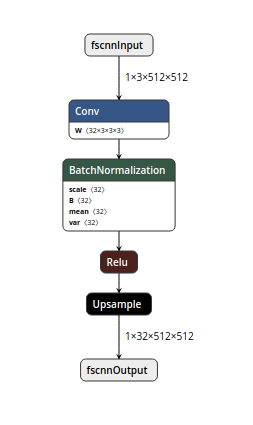
pseudo ONNX graph, visualized with NETRON
When a model is exported to the ONNX format, these operators are used to construct a computational graph (often called an intermediate representation) which represents the flow of data through the neural network.
Important: ONNX Is not a Runtime ONNX is only the representation that can be used with runtimes like ONNX Runtime. You can find a list of supported accelerators here.
2. What is Hugging Face Optimum?
Hugging Face Optimum is an open-source library and an extension of Hugging Face Transformers, that provides a unified API of performance optimization tools to achieve maximum efficiency to train and run models on accelerated hardware, including toolkits for optimized performance on Graphcore IPU and Habana Gaudi.
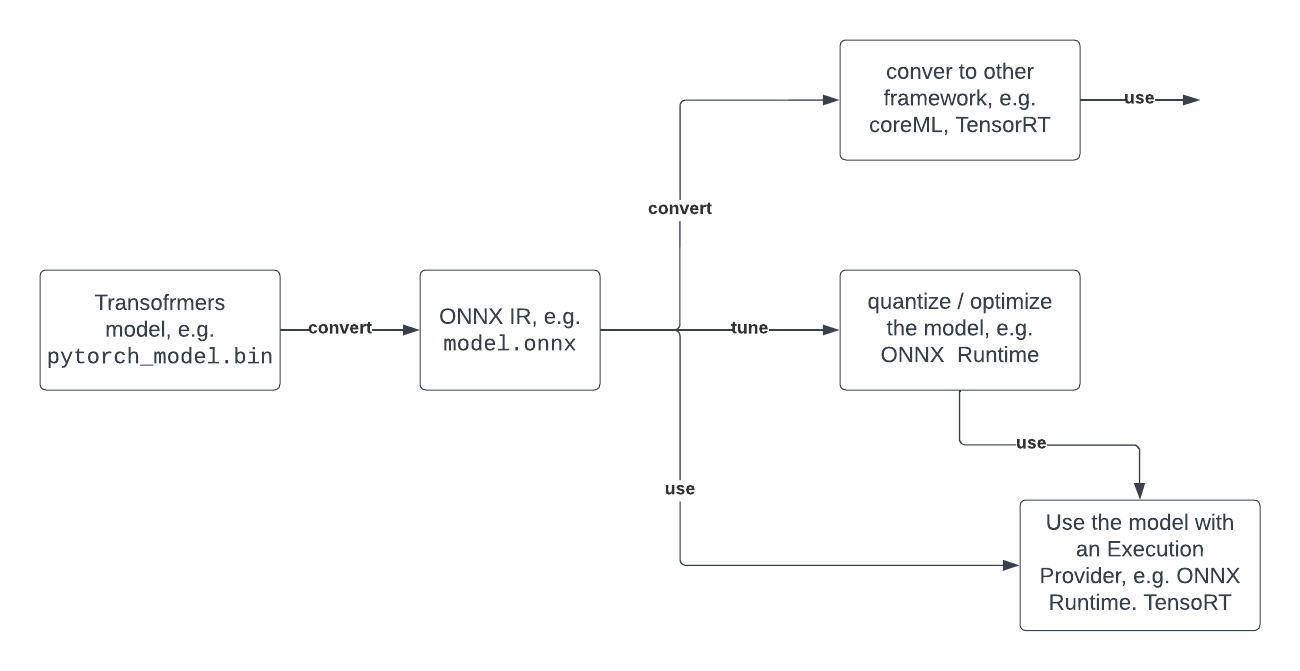
Optimum can be used for converting, quantization, graph optimization, accelerated training & inference with support for transformers pipelines.
Below you can see a typical developer journey of how you can leverage Optimum with ONNX.
3. What Transformers architectures are supported?
- ALBERT
- BART
- BERT
- DistilBERT
- ELECTRA
- GPT Neo
- GPT-J
- GPT-2
- RoBERTa
- T5
- ViT
- XLM
- …
➡️ All supported architectures
4. How can I convert a Transformers model (BERT) to ONNX?
Export with torch.onnx (low-level)
torch.onnx enables you to convert model checkpoints to an ONNX graph by the export method. But you have to provide a lot of values like input_names, dynamic_axes, etc.
You’ll first need to install some dependencies:
pip install transformers torchexporting our checkpoint with export
import torch
from transformers import AutoModelForSequenceClassification, AutoTokenizer

model_id = "distilbert-base-uncased-finetuned-sst-2-english"
model = AutoModelForSequenceClassification.from_pretrained(model_id)
tokenizer = AutoTokenizer.from_pretrained(model_id)
dummy_model_input = tokenizer("This is a sample", return_tensors="pt")

torch.onnx.export(
    model,
    tuple(dummy_model_input.values()),
    f="torch-model.onnx",
    input_names=['input_ids', 'attention_mask'],
    output_names=['logits'],
    dynamic_axes={'input_ids': {0: 'batch_size', 1: 'sequence'},
                  'attention_mask': {0: 'batch_size', 1: 'sequence'},
                  'logits': {0: 'batch_size', 1: 'sequence'}},
    do_constant_folding=True,
    opset_version=13,
)
Export with transformers.onnx (mid-level)
transformers.onnx enables you to convert model checkpoints to an ONNX graph by leveraging configuration objects. That way you don’t have to provide the complex configuration for dynamic_axes etc.
You’ll first need to install some dependencies:
pip install transformers[onnx] torchExporting our checkpoint with the transformers.onnx.
from pathlib import Path
import transformers
from transformers.onnx import FeaturesManager
from transformers import AutoConfig, AutoTokenizer, AutoModelForSequenceClassification

model_id = "distilbert-base-uncased-finetuned-sst-2-english"
feature = "sequence-classification"
model = AutoModelForSequenceClassification.from_pretrained(model_id)
tokenizer = AutoTokenizer.from_pretrained(model_id)

model_kind, model_onnx_config = FeaturesManager.check_supported_model_or_raise(model, feature=feature)
onnx_config = model_onnx_config(model.config)

onnx_inputs, onnx_outputs = transformers.onnx.export(
        preprocessor=tokenizer,
        model=model,
        config=onnx_config,
        opset=13,
        output=Path("trfs-model.onnx")
)
Export with Optimum (high-level)
Optimum Inference includes methods to convert vanilla Transformers models to ONNX using the ORTModelForXxx classes. To convert your Transformers model to ONNX you simply have to pass from_transformers=True to the from_pretrained() method and your model will be loaded and converted to ONNX leveraging the transformers.onnx package under the hood.
You’ll first need to install some dependencies:
pip install optimum[onnxruntime]Exporting our checkpoint with ORTModelForSequenceClassification
from optimum.onnxruntime import ORTModelForSequenceClassification

model = ORTModelForSequenceClassification.from_pretrained("distilbert-base-uncased-finetuned-sst-2-english",from_transformers=True)
The best part about the conversion with Optimum is that you can immediately use the model to run predictions or load it inside a pipeline.
5. What's next?
Since you successfully convert your Transformers model to ONNX the whole set of optimization and quantization tools is now open to use. Potential next steps can be:
- Use the onnx model for Accelerated Inference with Optimum and Transformers Pipelines
- Apply static quantization to your model for ~3x latency improvements
- Use ONNX runtime for training
- Convert your ONNX model to TensorRT to improve GPU performance
- …
If you are interested in optimizing your models to run with maximum efficiency, check out the 🤗 Optimum library.
Thanks for reading! If you have any questions, feel free to contact me, through Github, or on the forum. You can also connect with me on Twitter or LinkedIn.