Hugging Face Optimum 教程:将 Transformer 模型转换为 ONNX 格式
本文介绍了如何使用 Hugging Face Optimum 库将 PyTorch 或 TensorFlow 训练的 Transformer 模型导出为 ONNX 格式。该流程旨在优化模型在生产环境中的部署性能,支持在专用运行时和硬件上高效执行。
报道正文
本文目录9 个章节
使用 Hugging Face Optimum 将 Transformers 模型转换为 ONNX
发布于 2022 年 6 月 22 日 在 GitHub 上更新 点赞 10
每天都有数百个 Transformers 实验和模型上传至 Hugging Face Hub。进行这些实验的机器学习工程师和学生使用了多种框架,如 PyTorch、TensorFlow/Keras 等。这些模型已被成千上万家公司采用,构成了 AI 驱动产品的基础。
如果你要在生产环境中部署 Transformers 模型,我们建议首先将其导出为一种序列化格式,以便在专用运行时和硬件上进行加载、优化和执行。
在本指南中,你将了解:
- 什么是 ONNX?
- 什么是 Hugging Face Optimum?
- 支持哪些 Transformers 架构?
- 如何将 Transformers 模型(BERT)转换为 ONNX?
- 接下来做什么?
让我们开始吧!🚀
如果你对优化模型以实现最高运行效率感兴趣,请查看 🤗 Optimum 库。
1. 什么是 ONNX?
ONNX(Open Neural Network eXchange,开放神经网络交换格式)是一种用于表示机器学习模型的开放标准和格式。ONNX 定义了一组通用算子以及一种通用文件格式,用以表示包括 PyTorch 和 TensorFlow 在内的各种深度学习框架中的模型。
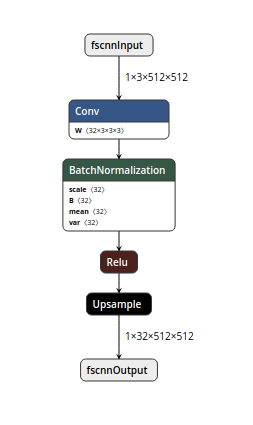
伪 ONNX 计算图,通过 NETRON 可视化
当模型被导出为 ONNX 格式时,这些算子会被用来构建一个计算图(通常称为 中间表示),该图描述了数据在神经网络中的流动过程。
Important: ONNX Is not a Runtime ONNX is only the representation that can be used with runtimes like ONNX Runtime. You can find a list of supported accelerators here.
2. What is Hugging Face Optimum?
Hugging Face Optimum is an open-source library and an extension of Hugging Face Transformers, that provides a unified API of performance optimization tools to achieve maximum efficiency to train and run models on accelerated hardware, including toolkits for optimized performance on Graphcore IPU and Habana Gaudi.
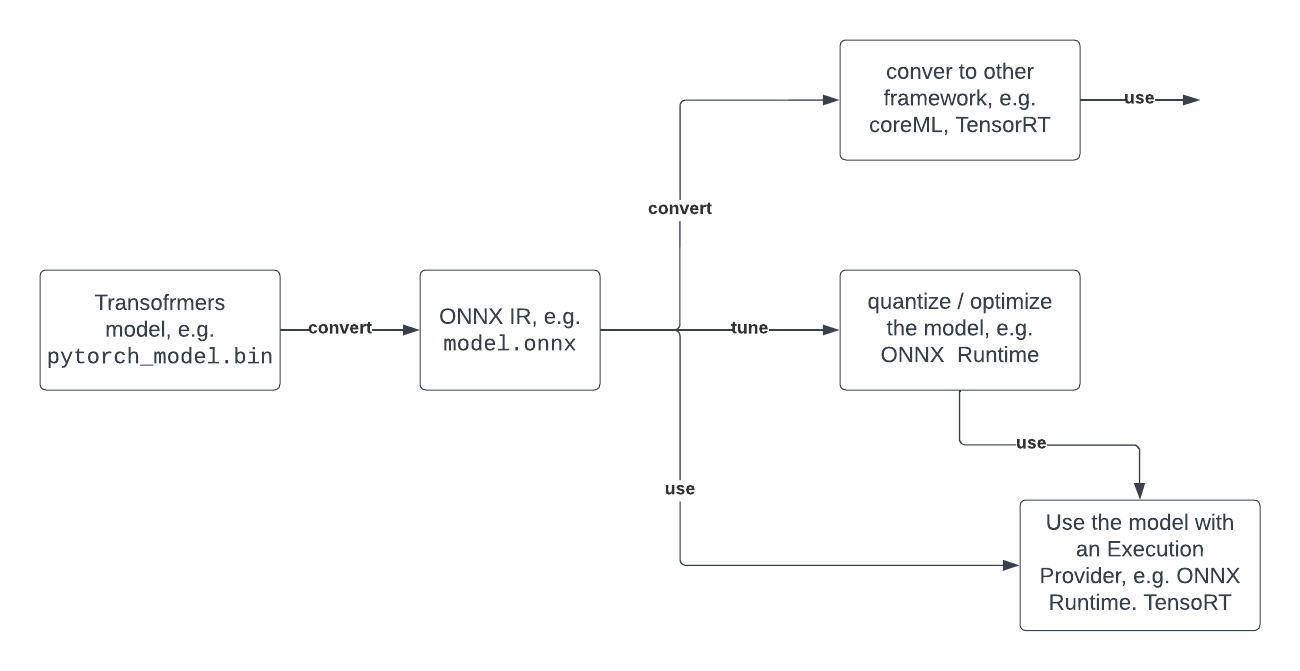
Optimum can be used for converting, quantization, graph optimization, accelerated training & inference with support for transformers pipelines.
Below you can see a typical developer journey of how you can leverage Optimum with ONNX.
3. What Transformers architectures are supported?
- ALBERT
- BART
- BERT
- DistilBERT
- ELECTRA
- GPT Neo
- GPT-J
- GPT-2
- RoBERTa
- T5
- ViT
- XLM
- …
➡️ All supported architectures
4. How can I convert a Transformers model (BERT) to ONNX?
Export with torch.onnx (low-level)
torch.onnx enables you to convert model checkpoints to an ONNX graph by the export method. But you have to provide a lot of values like input_names, dynamic_axes, etc.
You’ll first need to install some dependencies:
pip install transformers torchexporting our checkpoint with export
import torch
from transformers import AutoModelForSequenceClassification, AutoTokenizer

model_id = "distilbert-base-uncased-finetuned-sst-2-english"
model = AutoModelForSequenceClassification.from_pretrained(model_id)
tokenizer = AutoTokenizer.from_pretrained(model_id)
dummy_model_input = tokenizer("This is a sample", return_tensors="pt")

torch.onnx.export(
    model,
    tuple(dummy_model_input.values()),
    f="torch-model.onnx",
    input_names=['input_ids', 'attention_mask'],
    output_names=['logits'],
    dynamic_axes={'input_ids': {0: 'batch_size', 1: 'sequence'},
                  'attention_mask': {0: 'batch_size', 1: 'sequence'},
                  'logits': {0: 'batch_size', 1: 'sequence'}},
    do_constant_folding=True,
    opset_version=13,
)
Export with transformers.onnx (mid-level)
transformers.onnx enables you to convert model checkpoints to an ONNX graph by leveraging configuration objects. That way you don’t have to provide the complex configuration for dynamic_axes etc.
You’ll first need to install some dependencies:
pip install transformers[onnx] torchExporting our checkpoint with the transformers.onnx.
from pathlib import Path
import transformers
from transformers.onnx import FeaturesManager
from transformers import AutoConfig, AutoTokenizer, AutoModelForSequenceClassification

model_id = "distilbert-base-uncased-finetuned-sst-2-english"
feature = "sequence-classification"
model = AutoModelForSequenceClassification.from_pretrained(model_id)
tokenizer = AutoTokenizer.from_pretrained(model_id)

model_kind, model_onnx_config = FeaturesManager.check_supported_model_or_raise(model, feature=feature)
onnx_config = model_onnx_config(model.config)

onnx_inputs, onnx_outputs = transformers.onnx.export(
        preprocessor=tokenizer,
        model=model,
        config=onnx_config,
        opset=13,
        output=Path("trfs-model.onnx")
)
Export with Optimum (high-level)
Optimum Inference includes methods to convert vanilla Transformers models to ONNX using the ORTModelForXxx classes. To convert your Transformers model to ONNX you simply have to pass from_transformers=True to the from_pretrained() method and your model will be loaded and converted to ONNX leveraging the transformers.onnx package under the hood.
You’ll first need to install some dependencies:
pip install optimum[onnxruntime]Exporting our checkpoint with ORTModelForSequenceClassification
from optimum.onnxruntime import ORTModelForSequenceClassification

model = ORTModelForSequenceClassification.from_pretrained("distilbert-base-uncased-finetuned-sst-2-english",from_transformers=True)
The best part about the conversion with Optimum is that you can immediately use the model to run predictions or load it inside a pipeline.
5. What's next?
Since you successfully convert your Transformers model to ONNX the whole set of optimization and quantization tools is now open to use. Potential next steps can be:
- Use the onnx model for Accelerated Inference with Optimum and Transformers Pipelines
- Apply static quantization to your model for ~3x latency improvements
- Use ONNX runtime for training
- Convert your ONNX model to TensorRT to improve GPU performance
- …
If you are interested in optimizing your models to run with maximum efficiency, check out the 🤗 Optimum library.
Thanks for reading! If you have any questions, feel free to contact me, through Github, or on the forum. You can also connect with me on Twitter or LinkedIn.