OpenCode 发布 Browse 让智能体接管真实浏览器
OpenCode 推出 Browse,由 MCP 服务器与 Chromium 扩展组成,让智能体直接操作用户已登录的真实浏览器,在后台分组标签页中读取页面、点击、输入、截图与录制。遇到登录、2FA 或支付环节时,标签页会交还用户手动完成,再点继续恢复自动化。该工具兼容 OpenCode、Claude Code、Cursor、Codex、Zed 等主流 MCP 客户端,无需额外密钥配置。
报道正文
Browse
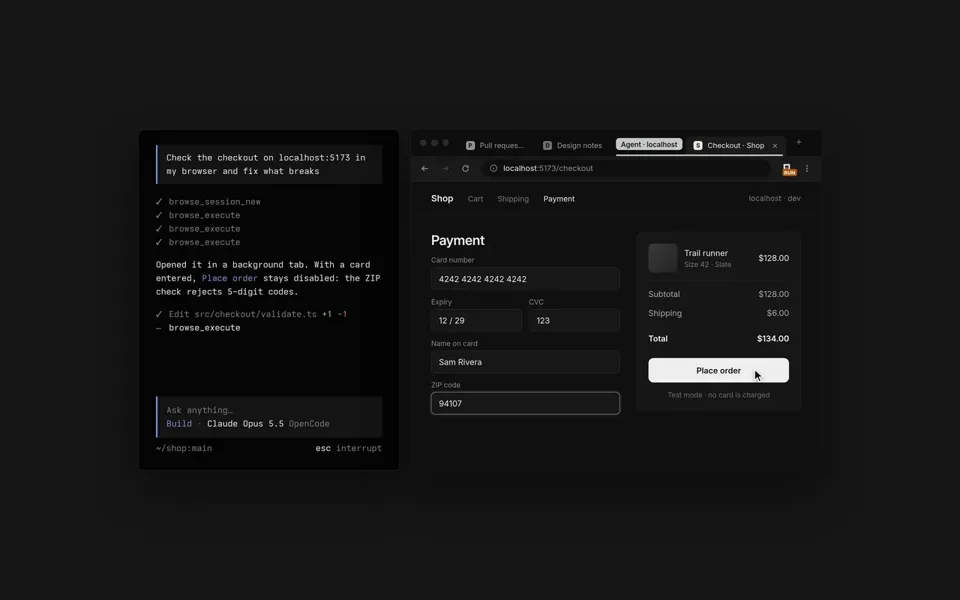
An MCP server and a Chromium extension that let your agents use your real browser, with your tabs, your logins and your extensions. They open tabs in the background, grouped out of your way, and read pages, click, type, take screenshots and record tabs. When it's your turn, for a login, a 2FA prompt or a payment, they hand the tab back to you and continue once you click Continue.
Add to Chrome (opens in a new tab)View source (opens in a new tab)
- Your real browserChrome, Edge, Brave, Arc, Helium, Vivaldi, Opera and Chromium.
- Out of your wayAgent tabs open in the background, in collapsed groups.
- HandoffsDo the login or 2FA step yourself, then click Continue.
- Lend a tabClick the toolbar button to hand an agent a tab you have open.
- Record and captureScreenshots, tab recordings and network traffic.
- Any MCP clientOpenCode, Claude Code, Cursor, Codex, Zed and many more.
- All your loginsAgents use the sites you're already signed into. No keys, no setup.
- Allowed sitesKeep an agent's tab on the sites you name.
Install the Chrome extension first. It walks you through the rest of the steps. To install the CLI directly (you should not need to do this), use any of these.
- curlcurl -fsSL https://opencode.ai/browse/install | bash
- pwshirm https://opencode.ai/browse/install.ps1 | iex
- npmnpm install -g @opencode/browse && browse install
- bunbun add -g @opencode/browse && browse install