Hugging Face 演示 AutoNLP 与 Prodigy 主动学习流程
Hugging Face 发布教程,展示如何结合 AutoNLP 和 Prodigy 构建主动学习管道。该流程通过迭代添加标注数据并重训练模型,旨在以低代码方式提升特定领域模型的精度。
报道正文
本文目录5 个章节
使用 AutoNLP 和 Prodigy 进行主动学习
发布于 2021 年 12 月 23 日 在 GitHub 上更新 点赞 2
在机器学习语境下,主动学习(Active Learning)是一个迭代过程:不断添加标注数据、重新训练模型并将其提供给最终用户。这是一个持续循环的过程,需要人工参与数据的标注或创建。本文将探讨如何利用 AutoNLP 和 Prodigy 构建一个主动学习流水线。
AutoNLP
AutoNLP 是由 Hugging Face 开发的一个框架,旨在帮助用户基于自有数据集构建最先进的深度学习模型,且几乎无需编写代码。AutoNLP 建立在 Hugging Face 的 transformers、datasets、inference-api 等众多强大工具的基础之上。
借助 AutoNLP,你可以在自定义数据集上训练 SOTA(State-of-the-Art,最先进)Transformer 模型,自动对其进行微调,并将模型服务给最终用户。所有通过 AutoNLP 训练的模型均达到业界领先水平,并具备生产就绪能力。
截至本文撰写时,AutoNLP 支持的任务包括二分类、回归、多分类、Token 分类(如命名实体识别 NER 或词性标注 POS)、问答、摘要等。你可以在此处查看所有支持任务的列表。AutoNLP 支持英语、法语、德语、西班牙语、印地语、荷兰语、瑞典语等多种语言。此外,它还支持使用自定义模型和自定义 Tokenizer(以防你的目标语言未被 AutoNLP 原生支持)。
Prodigy
Prodigy 是由 Explosion(spaCy 的开发团队)开发的标注工具。它是一个基于 Web 的工具,允许你实时对数据进行标注。Prodigy 支持诸如命名实体识别(NER)和文本分类等 NLP 任务,但其功能并不局限于 NLP!它还支持计算机视觉任务,甚至允许你创建自定义任务。你可以在此处尝试 Prodigy 演示:here。
请注意,Prodigy 是一款商业工具。你可以在此了解更多详情。
我们选择 Prodigy 是因为它是目前最流行的数据标注工具之一,且具有极高的可定制性。此外,它的安装和使用也非常简便。
数据集
现在进入本文最有趣的部分。在浏览了大量数据集和不同类型的问题后,我们在 Kaggle 上发现了 BBC News Classification(BBC 新闻分类)数据集。该数据集曾用于一次课堂竞赛,你可以在此访问。
让我们来看看这个数据集:
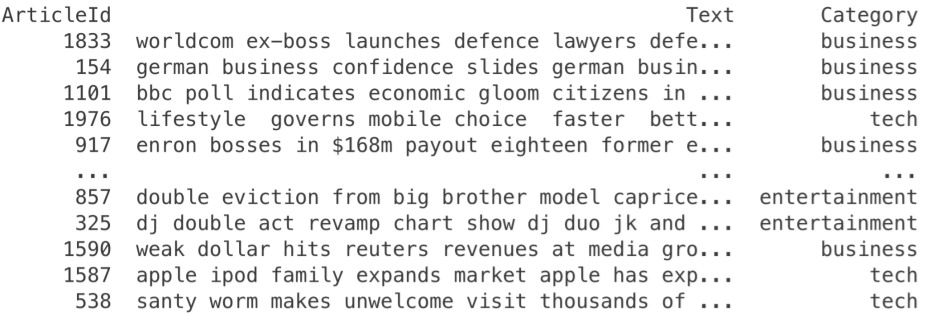
如你所见,这是一个分类数据集。其中包含一个 Text 列,存储新闻文章的文本内容;以及一个 Category 列,表示文章所属的类别。总共有 5 个不同的类别:business(商业)、entertainment(娱乐)、politics(政治)、sport(体育)和 tech(科技)。
使用 AutoNLP 在该数据集上训练多分类模型简直易如反掌。
步骤 1:下载数据集。
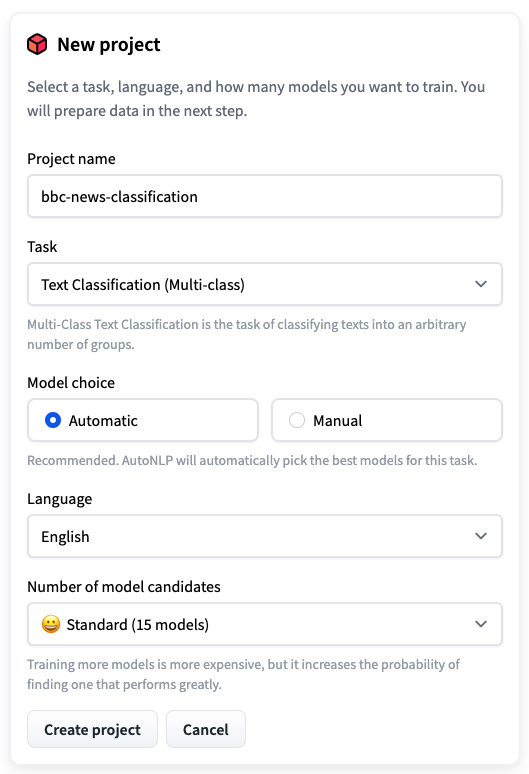
步骤 2:打开 AutoNLP 并创建一个新项目。
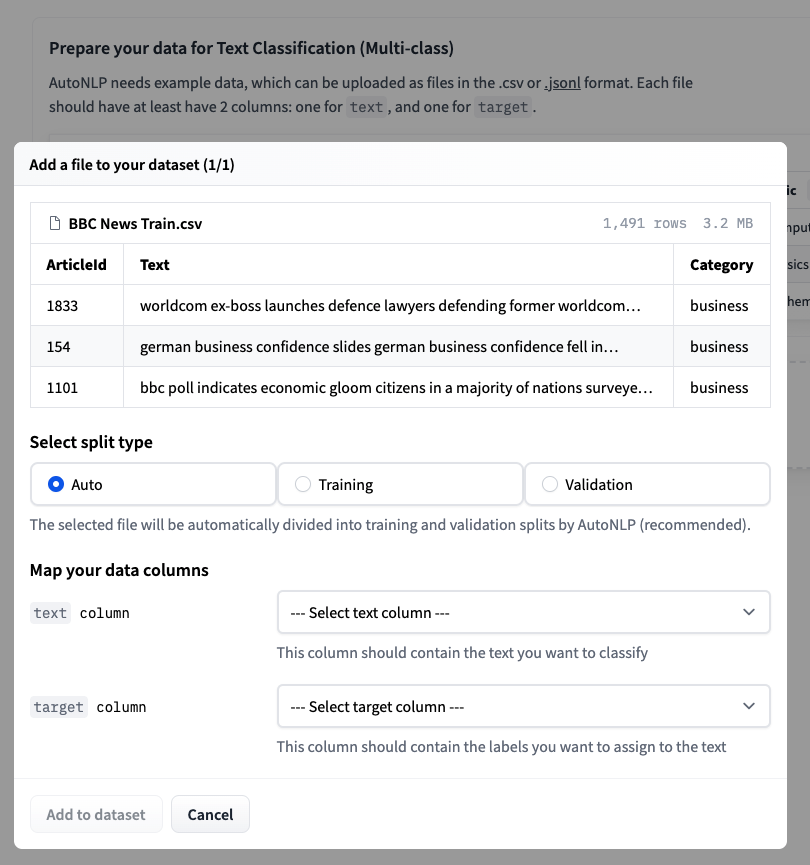
步骤 3:上传训练数据集并选择自动划分(auto-splitting)。
步骤 4:接受定价并开始训练模型。
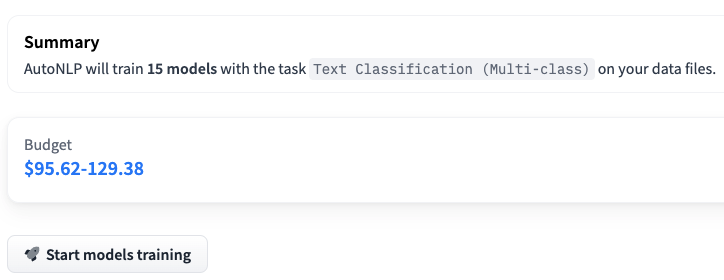
请注意,在上述示例中,我们训练了 15 个不同的多分类模型。AutoNLP 的价格低至每个模型 10 美元。AutoNLP 会自动为你挑选最佳模型并进行超参数调优。因此,现在你只需坐享其成,等待结果即可。
大约 15 分钟后,所有模型均完成训练,结果已就绪。看起来最佳模型的准确率达到了 98.67%!
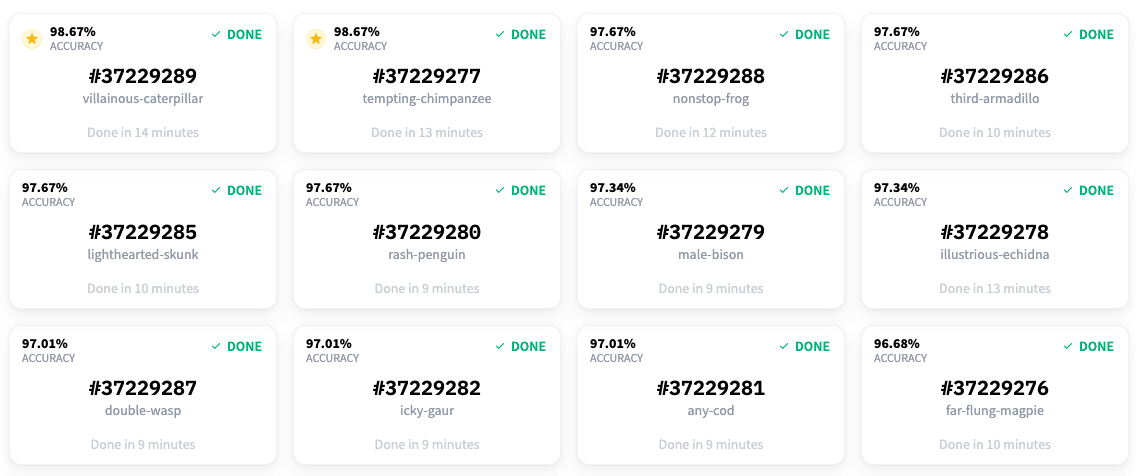
因此,我们现在能够以 98.67% 的准确率对数据集中的文章进行分类!但等等,我们之前不是在讨论主动学习(Active Learning)和 Prodigy 吗?它们去哪了?🤔 我们确实使用了 Prodigy,稍后就会看到。我们用它为命名实体识别(NER)任务标注了这个数据集。在开始标注工作之前,我们觉得如果能构建一个不仅能检测新闻文章中的实体、还能对其进行分类的项目会非常酷。这就是为什么我们在现有标签的基础上构建了上述分类模型。
主动学习
我们使用的数据集虽然包含类别信息,但没有用于实体识别的标签。因此,我们决定使用 Prodigy 为另一个任务——命名实体识别——来标注该数据集。
安装好 Prodigy 后,你只需运行以下命令:
$ prodigy ner.manual bbc blank:en BBC_News_Train.csv --label PERSON,ORG,PRODUCT,LOCATION让我们来看看各个参数的含义:
bbc是 Prodigy 将创建的数据集名称。blank:en指定所使用的spaCy分词器。BBC_News_Train.csv是用于标注的数据源文件。PERSON,ORG,PRODUCT,LOCATION是标注时使用的标签列表。
运行上述命令后,你可以访问 Prodigy 的 Web 界面(通常位于 localhost)并开始标注数据集。Prodigy 的界面非常简单、直观且易于使用。界面如下所示:
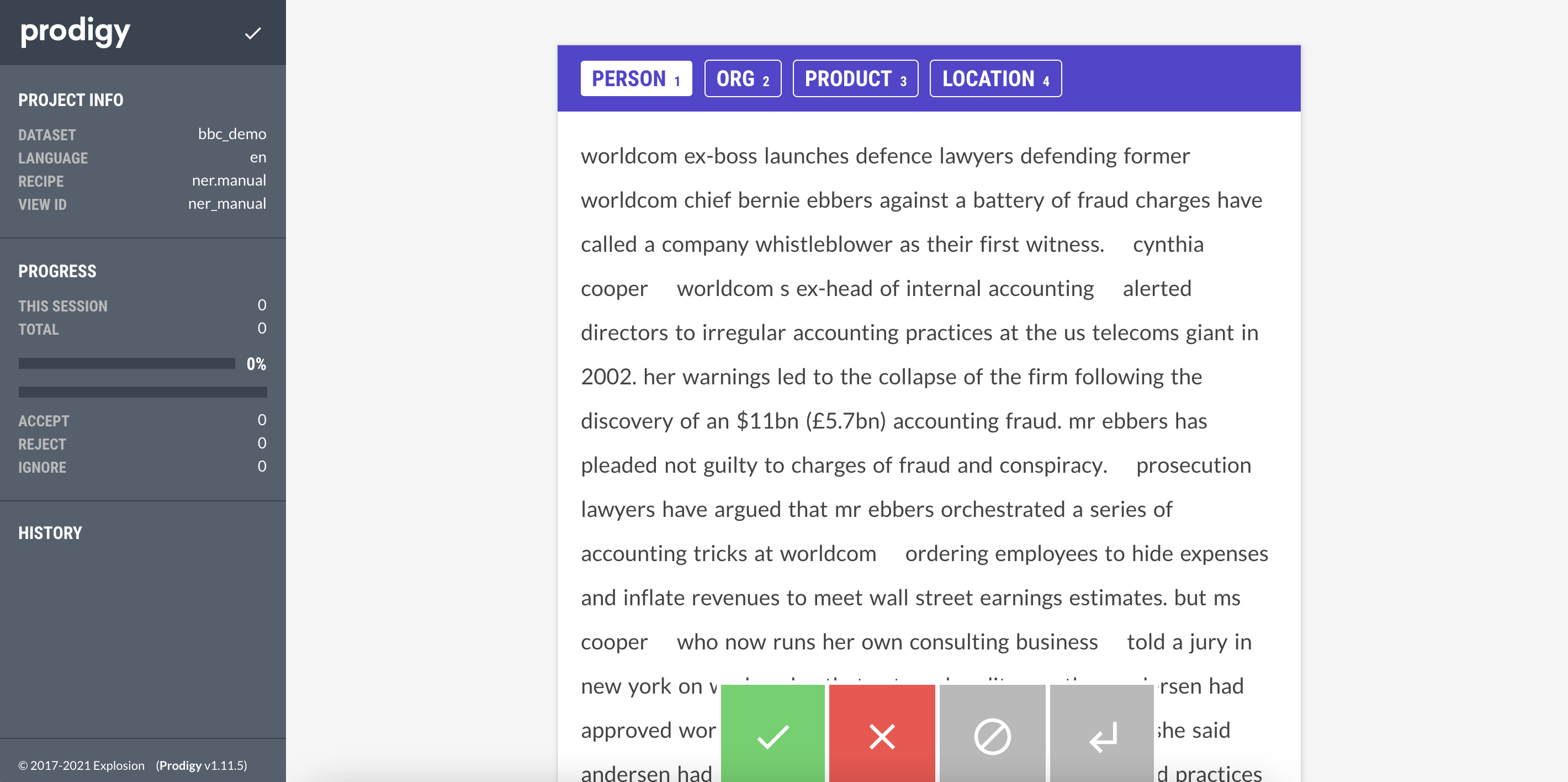
你只需要选择想要标注的实体类型(PERSON, ORG, PRODUCT, LOCATION),然后选中属于该实体的文本即可。完成一篇文档的标注后,点击绿色按钮,Prodigy 会自动提供下一篇未标注的文档。
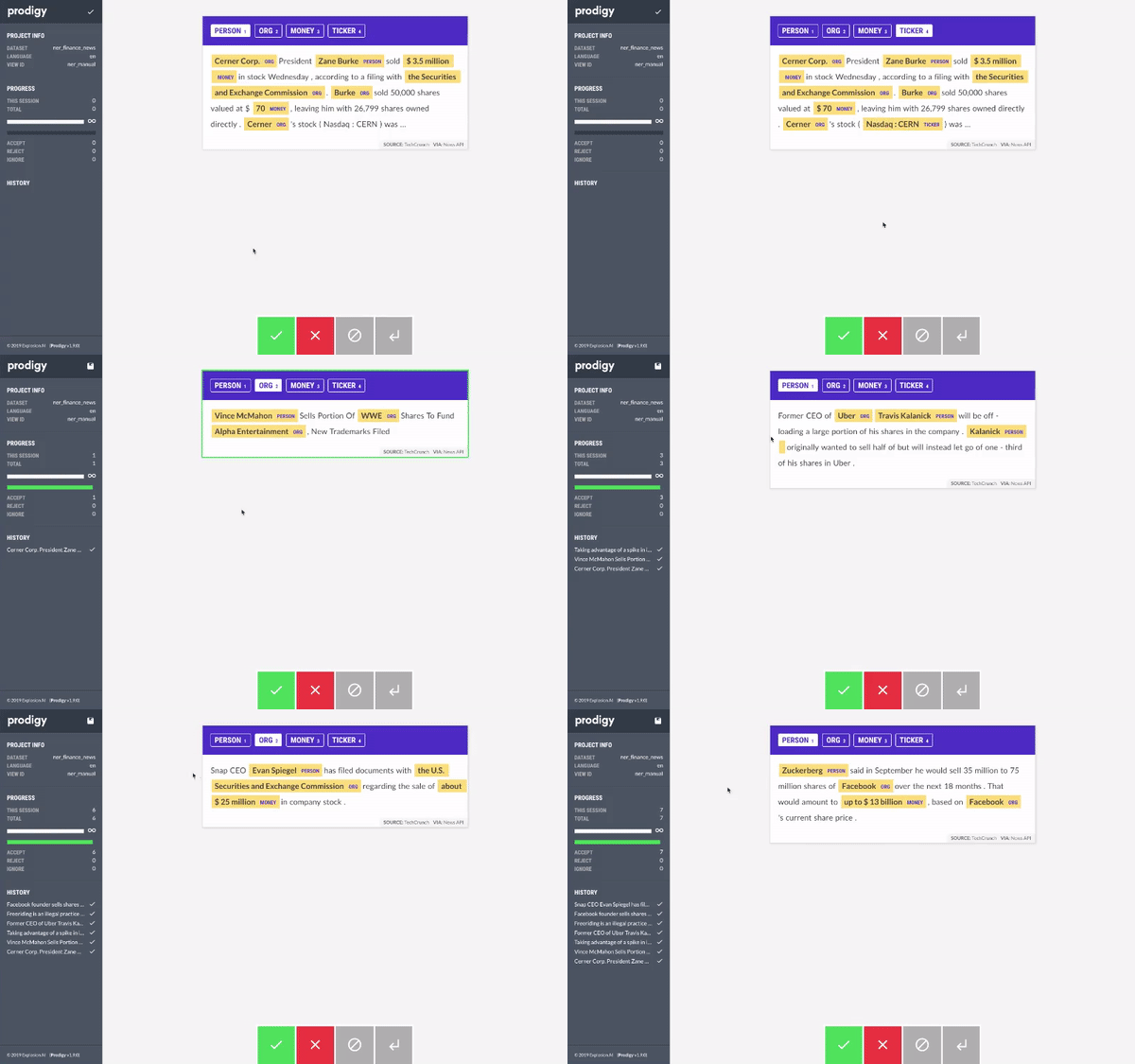
借助 Prodigy,我们开始了数据集的标注工作。当标注了大约 20 个样本后,我们就使用 AutoNLP 训练了一个模型。由于 Prodigy 导出的数据格式与 AutoNLP 不兼容,我们编写了一个快速脚本将数据转换为 AutoNLP 格式:
import json
import spacy

from prodigy.components.db import connect

db = connect()
prodigy_annotations = db.get_dataset("bbc")
examples = ((eg["text"], eg) for eg in prodigy_annotations)
nlp = spacy.blank("en")

dataset = []

for doc, eg in nlp.pipe(examples, as_tuples=True):
    try:
        doc.ents = [doc.char_span(s["start"], s["end"], s["label"]) for s in eg["spans"]]
        iob_tags = [f"{t.ent_iob_}-{t.ent_type_}" if t.ent_iob_ else "O" for t in doc]
        iob_tags = [t.strip("-") for t in iob_tags]
        tokens = [str(t) for t in doc]
        temp_data = {
            "tokens": tokens,
            "tags": iob_tags
        }
        dataset.append(temp_data)
    except:
        pass

with open('data.jsonl', 'w') as outfile:
    for entry in dataset:
        json.dump(entry, outfile)
        outfile.write('\n')
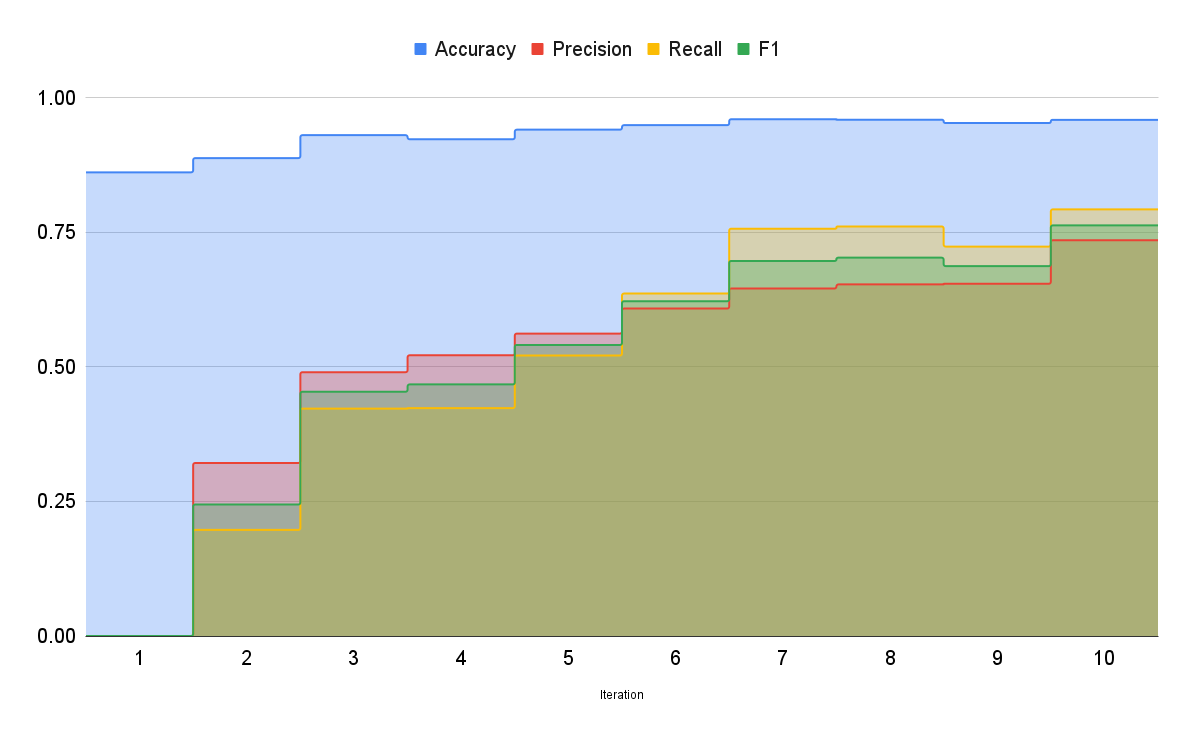
This will provide us with a JSONL file which can be used for training a model using AutoNLP. The steps will be same as before except we will select Token Classification task when creating the AutoNLP project. Using the initial data we had, we trained a model using AutoNLP. The best model had an accuracy of around 86% with 0 precision and recall. We knew the model didn't learn anything. It's pretty obvious, we had only around 20 samples.
After labelling around 70 samples, we started getting some results. The accuracy went up to 92%, precision was 0.52 and recall around 0.42. We were getting some results, but still not satisfactory. In the following image, we can see how this model performs on an unseen sample.
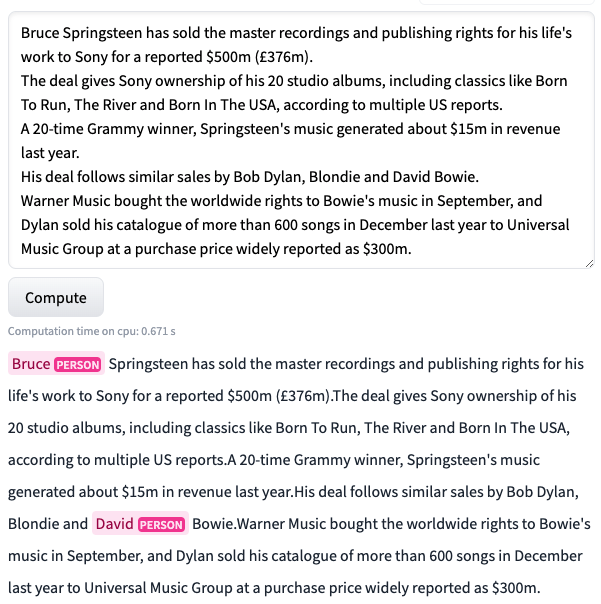
As you can see, the model is struggling. But it's much better than before! Previously, the model was not even able to predict anything in the same text. At least now, it's able to figure out that Bruce and David are names.
Thus, we continued. We labelled a few more samples.
Please note that, in each iteration, our dataset is getting bigger. All we are doing is uploading the new dataset to AutoNLP and let it do the rest.
After labelling around ~150 samples, we started getting some good results. The accuracy went up to 95.7%, precision was 0.64 and recall around 0.76.
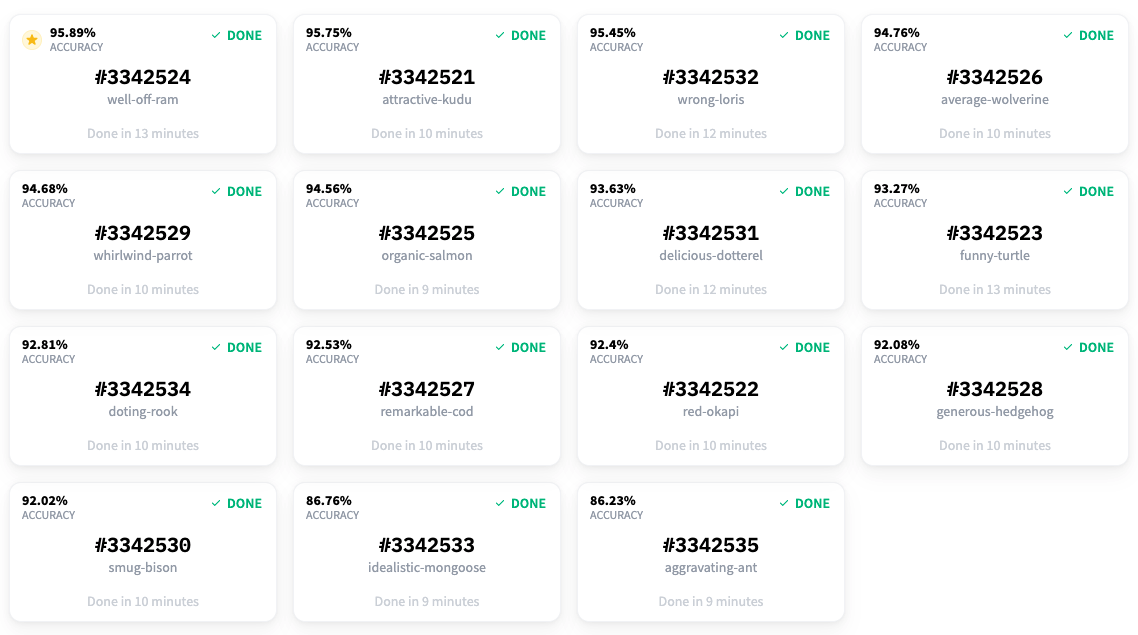
Let's take a look at how this model performs on the same unseen sample.
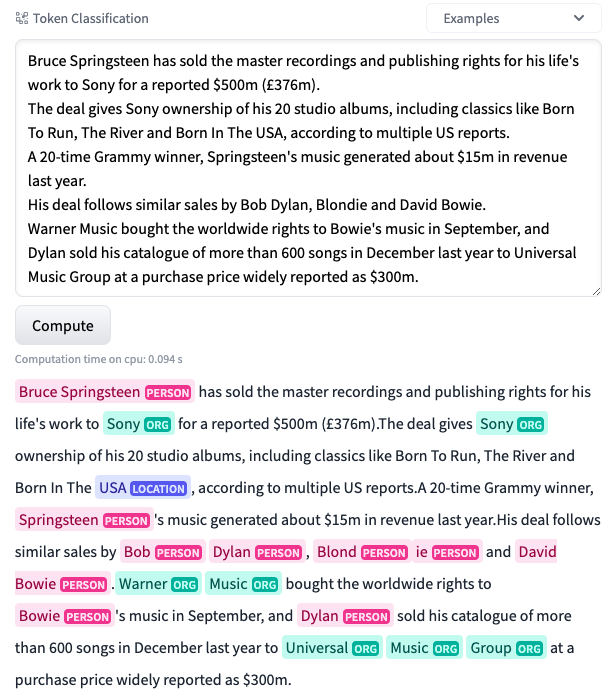
[注:本文篇幅超长,以上为核心前篇精译,后续内容保留原文呈现]
WOW! This is amazing! As you can see, the model is now performing extremely well! Its able to detect many entities in the same text. The precision and recall were still a bit low and thus we continued labeling even more data. After labeling around ~250 samples, we had the best results in terms of precision and recall. The accuracy went up to ~95.9% and precision and recall were 0.73 and 0.79 respectively. At this point, we decided to stop labelling and end the experimentation process. The following graph shows how the accuracy of best model improved as we added more samples to the dataset:
Well, it's a well known fact that more relevant data will lead to better models and thus better results. With this experimentation, we successfully created a model that can not only classify the entities in the news articles but also categorize them. Using tools like Prodigy and AutoNLP, we invested our time and effort only to label the dataset (even that was made simpler by the interface prodigy offers). AutoNLP saved us a lot of time and effort: we didn't have to figure out which models to use, how to train them, how to evaluate them, how to tune the parameters, which optimizer and scheduler to use, pre-processing, post-processing etc. We just needed to label the dataset and let AutoNLP do everything else.
We believe with tools like AutoNLP and Prodigy it's very easy to create data and state-of-the-art models. And since the whole process requires almost no coding at all, even someone without a coding background can create datasets which are generally not available to the public, train their own models using AutoNLP and share the model with everyone else in the community (or just use them for their own research / business).
We have open-sourced the best model created using this process. You can try it here. The labelled dataset can also be downloaded here.
Models are only state-of-the-art because of the data they are trained on.