NVIDIA 开源 LogitsProcessorZoo:精细化控制 LLM 生成概率
NVIDIA 发布开源库 LogitsProcessorZoo,允许开发者直接干预语言模型的概率分布以定制生成行为。该工具与 Hugging Face Transformers 深度集成,提供比传统解码策略更精细的控制能力,适用于需要严格约束输出格式或内容的场景。
报道正文
本文目录9 个章节
使用 NVIDIA LogitsProcessorZoo 控制语言模型生成
发布于 2024 年 12 月 23 日 在 GitHub 上更新 点赞 51
Aritra Roy Gosthipaty ariG23498 Ahmet Erdem aerdem4 nvidia
利用语言模型生成文本时,通常需要根据概率分布来选择下一个 token。一种直接的方法是 贪心搜索(greedy search),它选择概率最高的 token,但这可能导致输出内容过于通用或重复。为了增加多样性和可控性,业界广泛采用更高级的 解码策略(decoding strategies),例如束搜索(beam search)、核采样(nucleus sampling)和 top-k 采样。这些策略由 🤗 Transformers 库提供支持,赋予我们灵活塑造模型输出的能力。
但是,如果我们想更进一步,通过直接修改概率分布来 控制文本生成过程本身 呢?这正是 logit 处理(logit processing) 发挥作用的地方。Hugging Face 的 LogitsProcessor API 允许你自定义语言模型头部的预测分数,从而实现对模型行为的精细控制。🤗 Transformers 库不仅提供了丰富的内置 logits 处理器,还赋能社区创建和分享针对特定用例定制的处理器。
NVIDIA 推出的 LogitsProcessorZoo 应运而生——这是一套功能强大、模块化的 logits 处理器集合,专为控制序列长度、强制包含关键短语或引导多项选择题答案等特定任务而设计。NVIDIA 的这个库与 Hugging Face 的 generate 方法完全兼容,是 logits 处理领域社区驱动创新的优秀范例。
在本文中,我们将探讨 NVIDIA 的 LogitsProcessorZoo 如何增强并扩展现有功能,深入剖析其特性,并展示它如何优化你的 AI 工作流。
什么是语言模型中的 Logits?
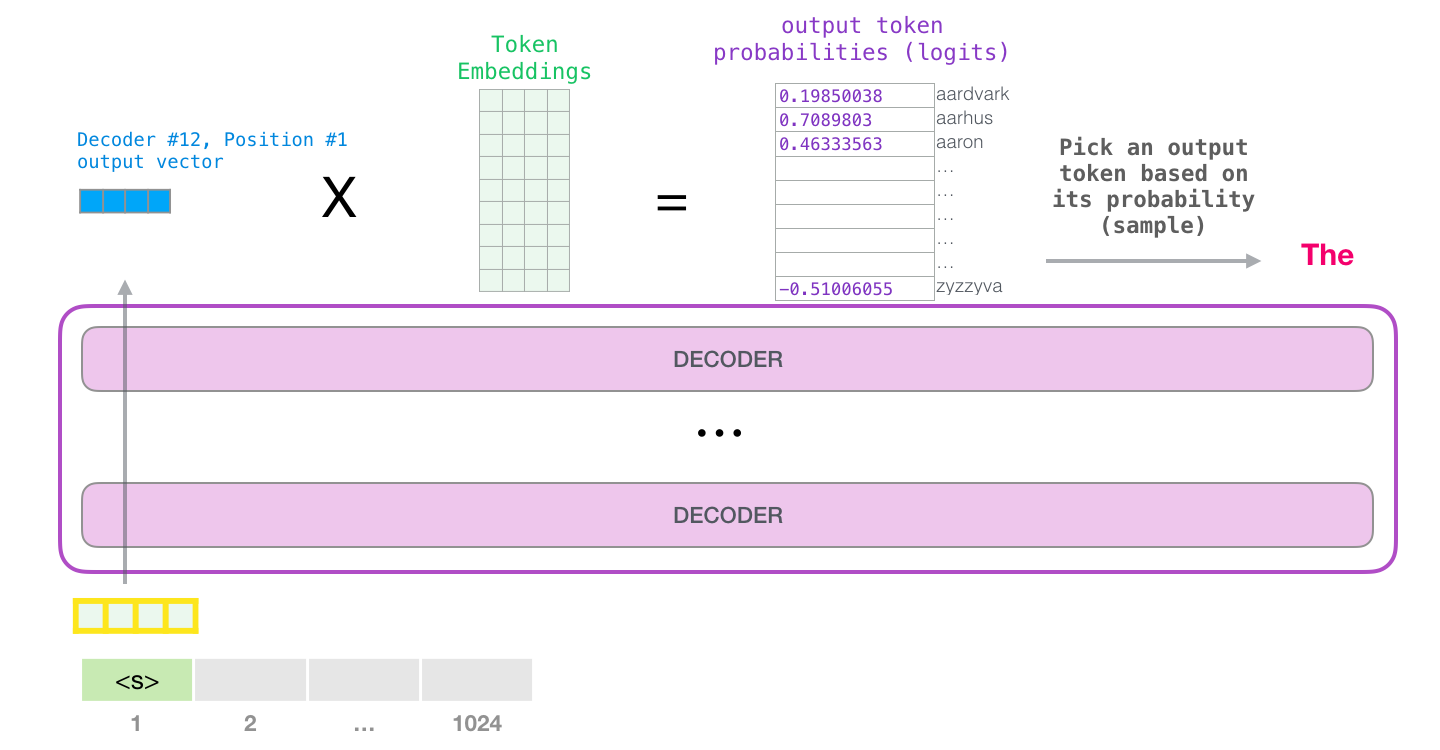 来源:https://jalammar.github.io/illustrated-gpt2/
Logits(逻辑值)是语言模型为其词汇表中每个 token 生成的原始、未归一化的分数。这些分数通过 softmax 函数转换为概率,从而指导模型选择下一个 token。
以下是 logits 在生成过程中的作用示例:
from transformers import AutoTokenizer, AutoModelForCausalLM
import torch

model_name = "meta-llama/Llama-3.2-1B"
tokenizer = AutoTokenizer.from_pretrained(model_name)
model = AutoModelForCausalLM.from_pretrained(model_name, torch_dtype=torch.bfloat16, device_map="auto")

prompt = "The capital of France is"
inputs = tokenizer(prompt, return_tensors="pt").to(model.device)

with torch.inference_mode():
    outputs = model(**inputs)
    logits = outputs.logits

last_token_logits = logits[:, -1, :]
这些 logits 代表了模型对每个潜在下一个词的置信度。利用 softmax,我们可以将它们转化为概率,并解码为生成的文本:
next_token_probs = torch.nn.functional.softmax(last_token_logits, dim=-1)

predicted_token_ids = torch.argmax(next_token_probs, dim=-1)
generated_text = tokenizer.batch_decode(predicted_token_ids, skip_special_tokens=True)
print("Generated Text:", generated_text[0])

>>> Generated Text: Paris
虽然上述流程展示了如何将原始 logits 转换为文本,但值得注意的是,🤗 Transformers 简化了这一过程。例如,generate() 方法会自动处理这些转换,包括应用 softmax 函数以及从概率分布中进行采样。
然而,对于采样或施加特定任务约束等常见任务而言,原始 logits 可能并不理想。有关在生成过程中有效处理 logits 的更多细节,请参考 Hugging Face 的 生成博客文章。这正是 logit processing(逻辑值处理)变得不可或缺的地方,以便根据具体需求定制输出。
为什么要处理 Logits?
在控制输出行为时,原始 logits 往往力不从心。例如:
- Lack of constraints: They might not adhere to required formats, grammar rules, or predefined structures.
- Overgeneralization: The model could prioritize generic responses instead of specific, high-quality outputs.
- Task misalignment: Sequences may end too early, be overly verbose, or miss critical details.
Logit processing enables us to tweak the model's behavior by modifying these raw scores before generation.
NVIDIA's LogitsProcessorZoo
NVIDIA's LogitsProcessorZoo simplifies post-processing of logits with modular components tailored for specific tasks. Let's explore its features and see how to use them. To follow along, head over to the notebook and experiment with the logits processors.
Install the library using:
pip install logits-processor-zooTo demonstrate the processors, we'll create a simple LLMRunner class that initializes a model and tokenizer, exposing a generate_response method. We will then provide different processors to the generate_response method and see them in action.
class LLMRunner:
    def __init__(self, model_name="meta-llama/Llama-3.2-1B-Instruct"):
        self.tokenizer = AutoTokenizer.from_pretrained(model_name)

self.model = AutoModelForCausalLM.from_pretrained(
            model_name,
            torch_dtype=torch.bfloat16,
            device_map="auto",
        )

def generate_response(self, prompts, logits_processor_list=None, max_tokens=1000):
        if logits_processor_list is None:
            logits_processor_list = []

for prompt in prompts:
            conversation = [
                {"role": "system", "content": "You are a helpful assistant."},
                {"role": "user", "content": prompt},
            ]
            inputs = self.tokenizer.apply_chat_template(
                conversation,
                tokenize=True,
                add_generation_prompt=True,
                return_tensors="pt",
                return_dict=True,
            ).to(self.model.device)

outputs = self.model.generate(
                **inputs,
                max_new_tokens=max_tokens,
                min_new_tokens=1,
                logits_processor=LogitsProcessorList(logits_processor_list),
            )

gen_output = self.tokenizer.batch_decode(
                outputs, skip_special_tokens=True, clean_up_tokenization_spaces=False
            )

generated_text = gen_output[0][
                len(
                    self.tokenizer.decode(
                        inputs["input_ids"][0], skip_special_tokens=True
                    )
                ) :
            ].strip()

print(f"Prompt: {prompt}")
            print()
            print(f"LLM response:\n{generated_text}")

runner = LLMRunner()
1. GenLengthLogitsProcessor
Control the length of generated sequences by adjusting the likelihood of the end-of-sequence (EOS) token.
This processor is particularly useful in scenarios where the desired length of generated text plays a crucial role, such as generating concise summaries, restricting verbose outputs, or tailoring responses to specific use cases. For instance, it can help ensure that a chatbot provides short and meaningful responses while maintaining grammatical integrity by completing sentences when required.
example_prompts =[
    "Tell me a story about a kid lost in forest."
]

print(runner.generate_response(
    example_prompts,
    [GenLengthLogitsProcessor(runner.tokenizer, boost_factor=0.1, p=2, complete_sentences=True)]
))
LLM response: Once upon a time, in a dense forest, there lived a young boy named Timmy. Timmy was on a family camping trip with his parents and little sister, Emma. They had been walking for hours, and the dense trees seemed to close in around them. As the sun began to set, Timmy realized he had wandered away from his family. At first, Timmy didn't panic. He thought about calling out for his parents and Emma, but his voice was hoarse from singing campfire songs. He looked around, but the trees seemed to stretch on forever, making it impossible to see any familiar landmarks. As the darkness grew thicker, Timmy's fear began to creep in.
print(runner.generate_response(
    example_prompts,
    [GenLengthLogitsProcessor(runner.tokenizer, boost_factor=-10.0, p=0, complete_sentences=False)]
))
[注:本文篇幅超长,以上为核心前篇精译,后续内容保留原文呈现]
LLM response: Once upon a time, in a dense and vibrant forest, there lived a young boy named Max. Max was an adventurous and curious 8-year-old who loved exploring the outdoors. One sunny afternoon, while wandering through the forest, he stumbled upon a narrow path he had never seen before. Excited by the discovery, Max decided to follow the path and see where it would lead. The forest was teeming with life, and the sunlight filtering through the trees created a magical atmosphere. Max walked for about 20 minutes, his eyes scanning the surroundings for any signs of civilization. As the sun began to set, casting a warm orange glow over the forest, Max realized he was lost. He had no phone, no wallet, and no way to communicate with his family. Panic started to set in, and Max began to feel scared and alone. Panicked, Max started to run through the forest, his heart racing and his legs trembling. He stumbled upon a clearing and saw a faint light in the distance. As he approached, he saw a small cabin in the center of the clearing. Smoke was rising from the chimney, and Max could hear the sound of someone singing a gentle tune. ...
In the examples above, we have used the GenLengthLogitsProcessor to both shorten and lengthen the response generated by the model.
2. CiteFromPromptLogitsProcessor
Boost or diminish tokens from the prompt to encourage similar outputs.
This is particularly valuable in tasks requiring context retention, such as answering questions based on a passage, generating summaries with specific details, or producing consistent outputs in dialogue systems. For example, in the given code snippet where a user review is analyzed, this processor ensures the model generates a response closely tied to the review's content, such as emphasizing opinions about the product's price.
example_prompts =[
    """
    A user review: very soft, colorful, expensive but deserves its price, stylish.

What is the user's opinion about the product's price?
    """,
]

print(runner.generate_response(
    example_prompts,
    [CiteFromPromptLogitsProcessor(runner.tokenizer, example_prompts, boost_factor=5.0)],
    max_tokens=50,
))
LLM response: Based on the user review, the user's opinion about the product's price is: the user is very satisfied, but the price is expensive, but the product is stylish, soft, and colorful, which is the price the user is willing to pay
Notice how the generation cites the input prompt.
3. ForceLastPhraseLogitsProcessor
Force the model to include a specific phrase before ending its output.
This processor is especially useful in structured content generation scenarios where consistency or adherence to a specific format is crucial. It is ideal for tasks like generating citations, formal reports, or outputs requiring specific phrasing to maintain a professional or organized presentation.
example_prompts = [
    """
    Retrieved information from: https://en.wikipedia.org/wiki/Bulbasaur
    Bulbasaur is a fictional Pokémon species in Nintendo and Game Freak's Pokémon franchise.
    Designed by Atsuko Nishida, Bulbasaur is a Grass and Poison-type, first appearing in Pocket Monsters: Red and Green (Pokémon Red and Blue outside Japan) as a starter Pokémon.
    Since then, it has reappeared in sequels, spin-off games, related merchandise, and animated and printed adaptations of the franchise.
    It is a central character in the Pokémon anime, being one of Ash Ketchum's main Pokémon for the first season, with a different one later being obtained by supporting character May.
    It is featured in various manga and is owned by protagonist Red in Pokémon Adventures.

What is Bulbasaur?
    """,
]

phrase = "\n\nReferences:"
batch_size = len(example_prompts)

print(runner.generate_response(
    example_prompts,
    [ForceLastPhraseLogitsProcessor(phrase, runner.tokenizer, batch_size)]
))
LLM response: According to the information retrieved from the Wikipedia article, Bulbasaur is a fictional Pokémon species in the Pokémon franchise. It is a Grass and Poison-type Pokémon, and it has been featured in various forms of media, including: - As a starter Pokémon in the first generation of Pokémon games, including Pokémon Red and Blue. - As a main character in the Pokémon anime, where it is one of Ash Ketchum's first Pokémon. - As a character in the Pokémon manga, where it is owned by protagonist Red. - As a character in various other Pokémon media, such as spin-off games and related merchandise. Bulbasaur is also a central character in the Pokémon franchise, often appearing alongside other Pokémon and being a key part of the Pokémon world. References: - https://en.wikipedia.org/wiki/Bulbasaur
phrase = "\n\nThanks for trying our RAG application! If you have more questions about"

print(runner.generate_response(example_prompts,
    [ForceLastPhraseLogitsProcessor(phrase, runner.tokenizer, batch_size)]
))
LLM response: Bulbasaur is a fictional Pokémon species in the Pokémon franchise. It is a Grass and Poison-type Pokémon, characterized by its distinctive appearance. Thanks for trying our RAG application! If you have more questions about Bulbasaur, feel free to ask.
With each generation we were able to add the phrase string right before the end of the generation.
4. MultipleChoiceLogitsProcessor
Guide the model to answer multiple-choice questions by selecting one of the given options.
This processor is particularly useful in tasks requiring strict adherence to a structured answer format, such as quizzes, surveys, or decision-making support systems.
example_prompts = [
"""
I am getting a lot of calls during the day. What is more important for me to consider when I buy a new phone?
0. Camera
1. Battery
2. Operating System
3. Screen Resolution

Answer:
""",
]

mclp = MultipleChoiceLogitsProcessor(
    runner.tokenizer,
    choices=["0", "1", "2", "3"],
    delimiter="."
)

print(runner.generate_response(example_prompts, [mclp], max_tokens=1))
LLM response: 1
Here our model does not generate anything other than the choice. This is an immensely helpful attribute while working with agents or using models for multiple choice questions.
Wrapping Up
Whether you are generating concise summaries, crafting chatbot responses, or solving structured tasks like multiple-choice questions, logit processors provide the flexibility to control outputs effectively. This makes them invaluable for scenarios where precision, adherence to constraints, or task-specific behavior is critical.
If you're interested in exploring more about how to control generation with logit processors, here are some resources to get started:
- How to Generate Text with Transformers – A beginner-friendly guide to understanding text generation in 🤗 Transformers.
- Hugging Face: Generation Strategies – Learn about decoding strategies like greedy search, beam search, and top-k sampling.
- Hugging Face: LogitsProcessor API – Dive deeper into how logits processing works in 🤗 Transformers and how to create custom logits processors.
- NVIDIA's LogitsProcessorZoo – Explore the full range of logits processors available in NVIDIA’s library with examples and use cases.
With NVIDIA's LogitsProcessorZoo and Hugging Face's tools, you have a robust ecosystem to take your language model applications to the next level. Experiment with these libraries, build custom solutions, and share your creations with the community to push the boundaries of what's possible with generative AI.