Zig 编写的 Linux 桌面邮件客户端 Parcel 开源
开发者 rockorager.dev 在 Tangled 平台开源了 Parcel,一款用 Zig 语言编写的 Linux 桌面邮件客户端,仓库已积累 287 次提交与 55 个标签。项目配套 mise 与 just 构建脚本,并提供 AGENTS.md 约定文件,方便开发者本地编译与参与贡献。
报道正文
本文目录8 个章节
parcel rockorager.dev / Star Starred Star 4 Something went wrong. Try again. Fork 0 Watch Watching Watch Star Starred Star 4 Something went wrong. Try again. Fork 0 Watch Watching Watch Branches Tags View all branches View all tags 287 1 55 Files .agents 18h agodata 1d agodocs 1d agosite 1d agosrc 19h ago.bs.zon 3d ago.envrc 1w ago.gitignore 2d agoAGENTS.md 19h agobuild.zig 1d agobuild.zig.zon 19h agojustfile 2d agomise.lock 3d agomise.toml 3d agoREADME.md 1d ago Commits 287 build: fetch the orb's dependencies with bs, the lazy ones tootoo rockorager.dev · 18h ago Copy SHA release: 1.1.0 rockorager.dev · 19h ago · v1.1.0 Copy SHA reader: copy the selected text with Ctrl+CCtrl+C rockorager.dev · 19h ago Copy SHA Branches 1 main · 18h ago Default Tags 55 v1.1.0 · 19h ago Latest
- Zig 99%
- HTML <1%
- CSS <1%
- Python <1%
- Shell <1%
- 1 more language <1%
README.md
parcel #
A mail client for Gmail and Fastmail on the Linux desktop, built with Zig and siv.
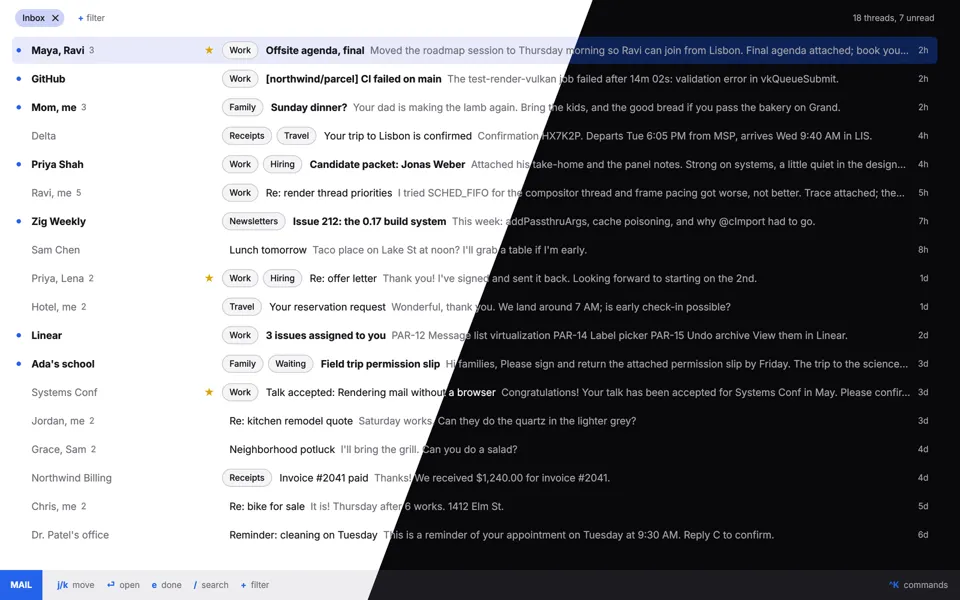
Parcel shows mail as one list, chosen by label filters you stack: Inbox, or Inbox and Work, or any label alone. Every action has a key, and Ctrl+K lists them all. It reads your Gmail, Fastmail, or any JMAP server once you sign in, and shows sample mail until then. Each account has its own list, and the header switches between them.
A look around #
A thread opens over the list. Quoted replies nest, each level under a rule of its own, and HTML mail shows as its sender laid it out.
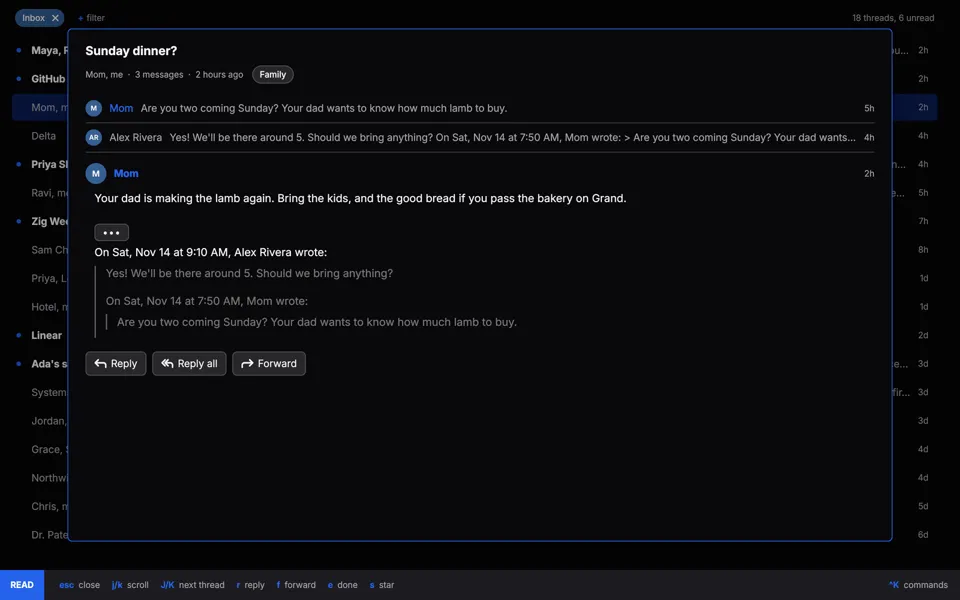
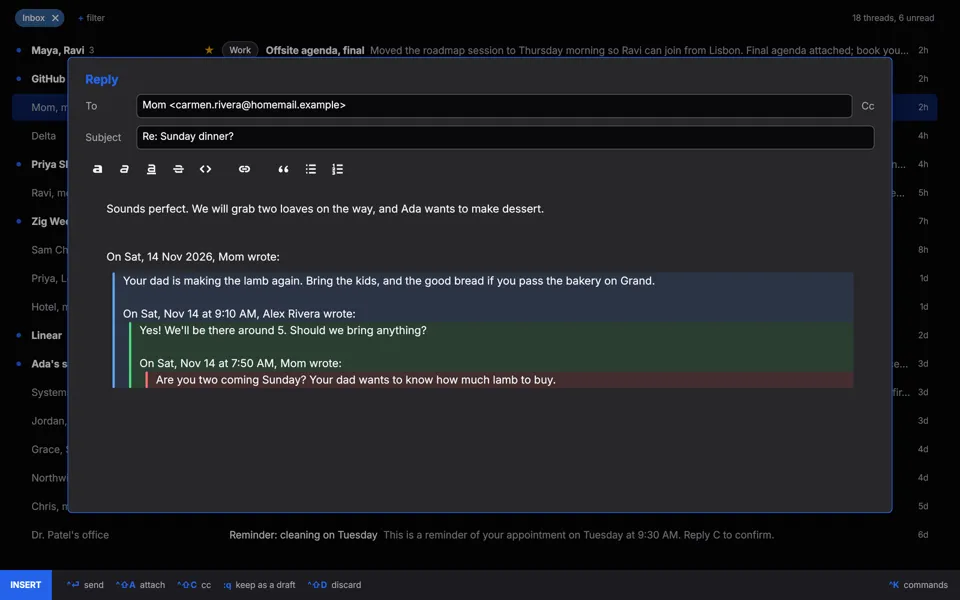
r replies, over a quote of what you answer. The editor has Vim's keys and a toolbar for marks, links, quotes, and lists.
/ searches as you type, with Gmail's operators, whichever account it is. Right after an operator such as from:, it suggests the people, labels, or values it takes. Parcel keeps its own index of your mail, and once it has been through all of it, answers most searches without asking the server.
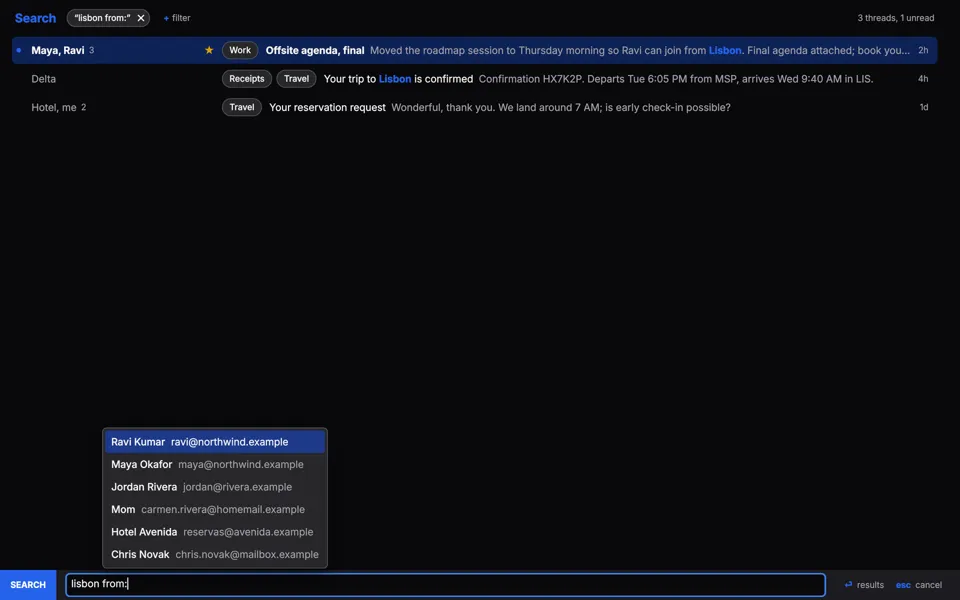
The mail in these screenshots is made up.
Build it #
Parcel needs Zig 0.17.1, just, a Wayland compositor, and the development files for libcurl, Wayland, xkbcommon, Fontconfig, and the Vulkan headers:
sudo apt install just libcurl4-openssl-dev libwayland-dev libxkbcommon-dev libfontconfig-dev libvulkan-dev  # Debian, Ubuntu
sudo dnf install just libcurl-devel wayland-devel libxkbcommon-devel fontconfig-devel vulkan-headers        # Fedora
sudo pacman -S just curl wayland libxkbcommon fontconfig vulkan-headers                                     # Arch
Then:
just runInstall it #
just installThis puts parcel in ~/.local/bin, and its desktop entry and icon in ~/.local/share, so app launchers list Parcel. Pass another prefix to install elsewhere, such as just install /usr/local (with sudo).
Sign in #
Parcel opens on sample mail under its Add account page until it has an account; after that, the palette's Add account (Ctrl+K) opens the page. Sign in with Google, Fastmail, or another JMAP server; the account opens as soon as you have, named for the address you signed in with.
Each account has a name, its directory's under ~/.local/state/parcel/accounts, which the header shows and Ctrl+1 to Ctrl+9 count in sorted order. Rename an account by renaming its directory while parcel is not running.
Gmail #
Gmail signs in in the browser with Parcel's own Google client, which release builds carry. An account's refresh token is kept in its directory's google-token, readable only by you.
Where a Google Workspace admin blocks apps they have not approved, ask them to trust Parcel's client ID. Or use a client of your own, which Parcel prefers whenever it is there; a build from source without -Dgoogle-client-secret needs one too:
- In the Google Cloud console, enable the Gmail API for a project: your organization's, where Workspace trusts its own apps.
- Under Google Auth Platform, create a client of type Desktop app. For a project outside your organization, add yourself as a test user.
- Download the client's JSON and save it as
~/.config/parcel/google-client.json. - Add the account, and sign in in the browser it opens.
A sign-in works only with the client that made it, so an account signed in with your own client keeps needing its file. While your project's app is in testing, Google expires the sign-in after seven days; sign in again then with parcel login gmail NAME.
Fastmail and other JMAP servers #
Fastmail signs in in the browser: Parcel registers itself with Fastmail as it signs in, so there is nothing to set up. Another JMAP server does the same where it offers OAuth for desktop apps; give it the server's address. Either one also takes a token in place of the browser: for Fastmail, make one in Settings, Privacy & Security, Manage API tokens, with access to Email and Email submission; a token of the form user:password goes as Basic authorization.
The sign-in is kept in the account's directory, readable only by you: jmap-oauth for the browser's, jmap-token for a token. From a terminal, parcel login fastmail NAME and parcel login jmap NAME https://mail.example.org/.well-known/jmap sign in with a token too.
Work on it #
mise installs the toolchain, including bs, the Debug-mode compiler used for development builds, which also lints: mise install, then just setup for the baskingspot lint rules. just --list shows the recipes, and just ci builds parcel and runs the tests and lint. AGENTS.md has the conventions.