Transformers 引入约束束搜索控制生成
Hugging Face Transformers 库正式集成约束束搜索(Constrained Beam Search)功能,允许开发者在文本生成过程中强制包含特定词汇或短语。该特性通过修改解码逻辑,解决了传统束搜索无法保证输出包含关键信息的问题,适用于机器翻译、摘要等需严格遵循术语的场景。
报道正文
本文目录12 个章节
在 🤗 Transformers 中使用受限束搜索引导文本生成
发布于 2022 年 3 月 11 日 在 GitHub 上更新 点赞 17
Chan Woo Kim cwkeam 客座作者
本文也有简体中文版本:简体中文。
引言
阅读本文需要读者熟悉使用不同变体的束搜索(beam search)进行文本生成的方法,相关内容已在博客文章 "如何生成文本:使用 Transformers 中的不同解码方法进行语言生成" 中详细阐述。
与普通束搜索不同,受限束搜索允许我们对文本生成的输出施加控制。这非常有用,因为有时我们确切地知道输出中需要包含什么内容。例如,在神经机器翻译任务中,通过词典查找,我们可能知道最终翻译中必须包含哪些单词。有时候,对于语言模型来说几乎同等可能的生成输出,由于特定的上下文原因,对终端用户而言并不具有同等的吸引力。这两种情况都可以通过允许用户告知模型哪些单词必须包含在最终输出来解决。
为什么这很难
然而,这实际上是一个非平凡的问题。这是因为该任务要求我们在最终输出的某个位置、在生成过程的某个时间点强制生成某些子序列。
假设我们要生成一个句子 S,其中必须按顺序包含短语 p1={t1,t2} p_1={ t_1, t_2 } p1={t1,t2},其 token 为 t1,t2 t_1, t_2 t1,t2。让我们定义预期句子 S S S 如下:
Sexpected={s1,s2,...,sk,t1,t2,sk+1,...,sn} S_{expected} = { s_1, s_2, ..., s_k, t_1, t_2, s_{k+1}, ..., s_n } Sexpected={s1,s2,...,sk,t1,t2,sk+1,...,sn}
问题在于,beam search 是逐 token生成序列的。虽然这种说法并不完全准确,但我们可以将 beam search 视为一个函数 ,它查看当前已生成的从 $0ii+1i < kki=ki > k$?
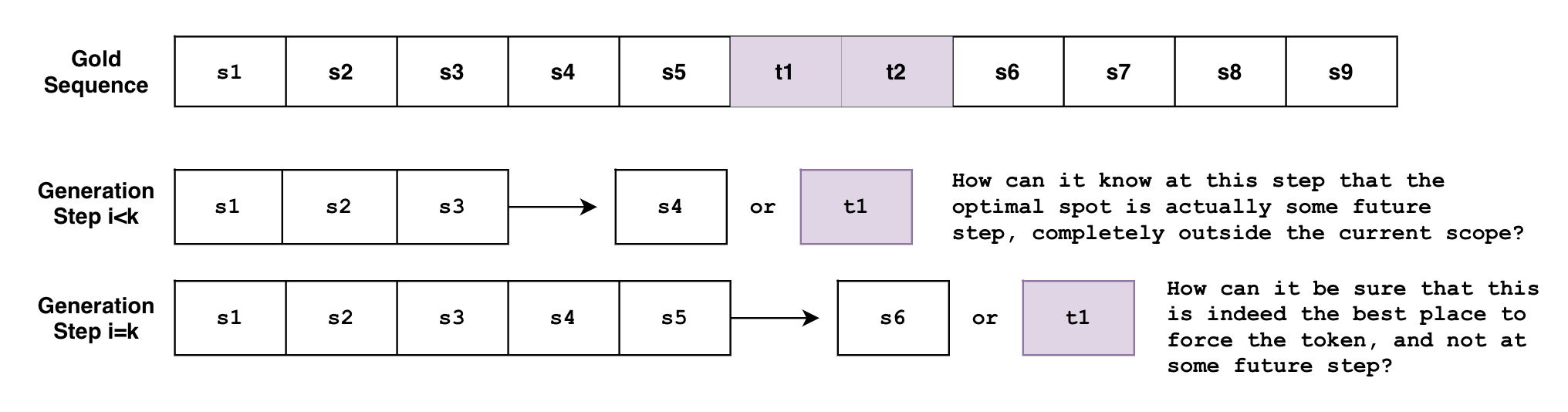
如果你有多个具有不同要求的约束条件怎么办?如果你想强制短语 并且也强制短语 呢?如果你希望模型在两个短语之间做出选择呢?如果我们想强制短语 ,并在短语列表 中只强制其中一个短语呢?
上述示例实际上是非常合理的使用场景(下文将会展示),而新的 constrained beam search 功能允许实现所有这些需求!
本文将快速介绍新的 constrained beam search 功能能为你做什么,然后深入探讨其底层工作原理。
示例 1:强制包含特定单词
假设我们要将 "How old are you?" 翻译成德语。
在非正式场合,你会说 "Wie alt bist du?";而在正式场合,你会说 "Wie alt sind Sie?"。
根据上下文,我们可能更倾向于其中一种正式程度,但我们该如何告诉模型这一点呢?
传统 Beam Search
以下是我们在 传统 beam search 设置下进行文本翻译的方法。
!pip install -q git+https://github.com/huggingface/transformers.gitfrom transformers import AutoTokenizer, AutoModelForSeq2SeqLM
tokenizer = AutoTokenizer.from_pretrained("t5-base")
model = AutoModelForSeq2SeqLM.from_pretrained("t5-base")
encoder_input_str = "translate English to German: How old are you?"
```python
input_ids = tokenizer(encoder_input_str, return_tensors="pt").input_ids
outputs = model.generate(
input_ids,
num_beams=10,
num_return_sequences=1,
no_repeat_ngram_size=1,
remove_invalid_values=True,
)
print("Output:\n" + 100 * '-')
print(tokenizer.decode(outputs[0], skip_special_tokens=True))Output:
----------------------------------------------------------------------------------------------------
Wie alt bist du?使用受限束搜索(Constrained Beam Search)
但如果我们想要的是正式用语而非非正式表达呢?如果我们基于先验知识知道生成结果必须包含某些内容,并且可以将这些内容注入到生成过程中,该怎么办?
以下是现在通过 model.generate() 的 force_words_ids 关键字参数可以实现的功能:
tokenizer = AutoTokenizer.from_pretrained("t5-base")
model = AutoModelForSeq2SeqLM.from_pretrained("t5-base")

encoder_input_str = "translate English to German: How old are you?"

force_words = ["Sie"]

input_ids = tokenizer(encoder_input_str, return_tensors="pt").input_ids
force_words_ids = tokenizer(force_words, add_special_tokens=False).input_ids

outputs = model.generate(
    input_ids,
    force_words_ids=force_words_ids,
    num_beams=5,
    num_return_sequences=1,
    no_repeat_ngram_size=1,
    remove_invalid_values=True,
)

print("Output:\n" + 100 * '-')
print(tokenizer.decode(outputs[0], skip_special_tokens=True))Output:
----------------------------------------------------------------------------------------------------
Wie alt sind Sie?正如你所见,我们能够利用关于期望输出的先验知识来引导生成过程。以前,我们必须先生成大量可能的输出,然后筛选出符合要求的选项。现在,我们可以在生成阶段直接完成这一操作。
示例 2:析取约束(Disjunctive Constraints)
上文我们提到了一种用例,即我们知道最终输出中需要包含哪些单词。例如,在神经机器翻译中使用词典查找就是这种情况。
但如果我们不知道应该使用哪种词形呢?比如我们希望 ["raining", "rained", "rains", ...] 等输出具有同等的可能性?从更广泛的角度来看,总有一些情况是我们不希望逐字逐句地匹配确切的单词,而是对其他相关的变体持开放态度。
允许这种行为的约束是 析取约束(Disjunctive Constraints),它允许用户输入一个单词列表,其目的是引导生成过程,使得最终输出必须包含该列表中 至少一个 单词。
下面是一个结合使用上述两种约束类型的示例:
from transformers import GPT2LMHeadModel, GPT2Tokenizer

model = GPT2LMHeadModel.from_pretrained("gpt2")
tokenizer = GPT2Tokenizer.from_pretrained("gpt2")

force_word = "scared"
force_flexible = ["scream", "screams", "screaming", "screamed"]

force_words_ids = [
    tokenizer([force_word], add_prefix_space=True, add_special_tokens=False).input_ids,
    tokenizer(force_flexible, add_prefix_space=True, add_special_tokens=False).input_ids,
]

starting_text = ["The soldiers", "The child"]

input_ids = tokenizer(starting_text, return_tensors="pt").input_ids

outputs = model.generate(
    input_ids,
    force_words_ids=force_words_ids,
    num_beams=10,
    num_return_sequences=1,
    no_repeat_ngram_size=1,
    remove_invalid_values=True,
)

print("Output:\n" + 100 * '-')
print(tokenizer.decode(outputs[0], skip_special_tokens=True))
print(tokenizer.decode(outputs[1], skip_special_tokens=True))Setting `pad_token_id` to `eos_token_id`:50256 for open-end generation.
Output:
----------------------------------------------------------------------------------------------------
The soldiers, who were all scared and screaming at each other as they tried to get out of the
The child was taken to a local hospital where she screamed and scared for her life, police said.正如你所见,第一个输出使用了 "screaming",第二个输出使用了 "screamed",并且两者都原样使用了 "scared"。供选择的列表 ["screaming", "screamed", ...] 不必局限于单词的不同形式;这可以满足任何只需从单词列表中选取一个即可的用例。
传统束搜索(Beam Search)
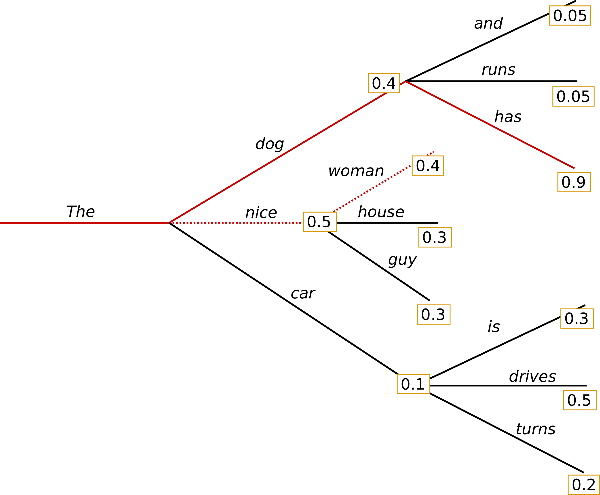
与贪心搜索不同,束搜索通过保留更长的假设列表来工作。在上面的图片中,我们在生成的每个可能步骤展示了三个可能的下一个 token。
[注:本文篇幅超长,以上为核心前篇精译,后续内容保留原文呈现]
Here's another way to look at the first step of the beam search for the above example, in the case of num_beams=3:
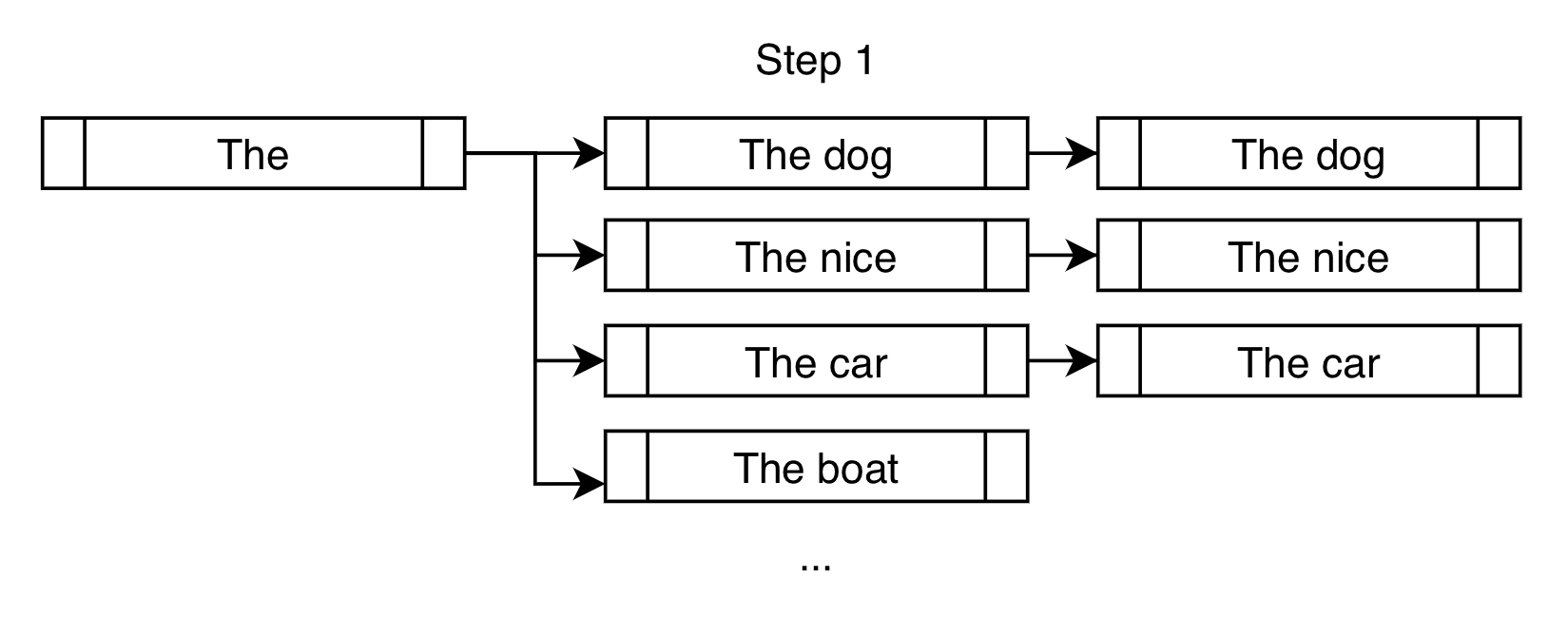
Instead of only choosing "The dog" like what a greedy search would do, a beam search would allow further consideration of "The nice" and "The car".
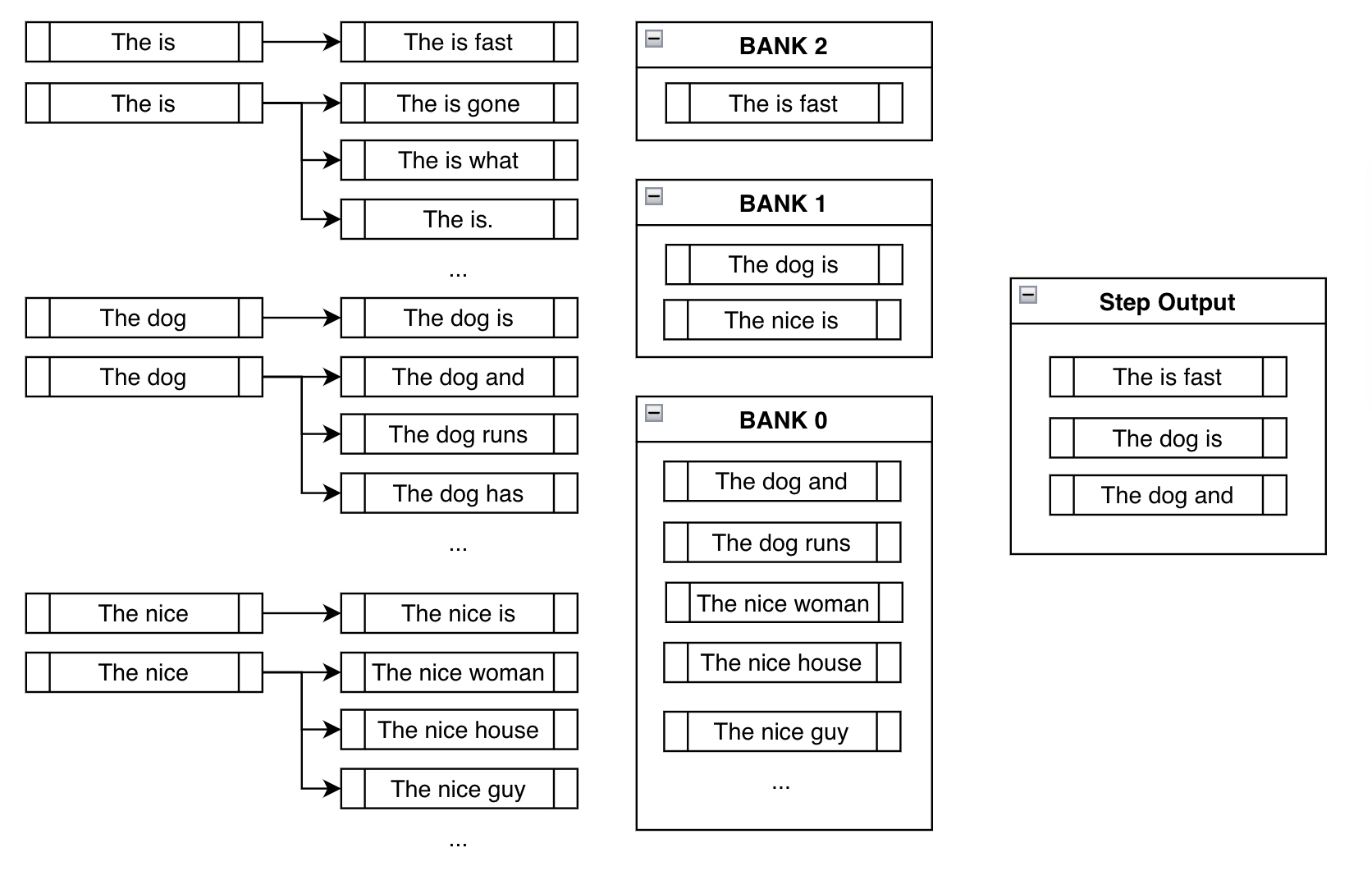
In the next step, we consider the next possible tokens for each of the three branches we created in the previous step.
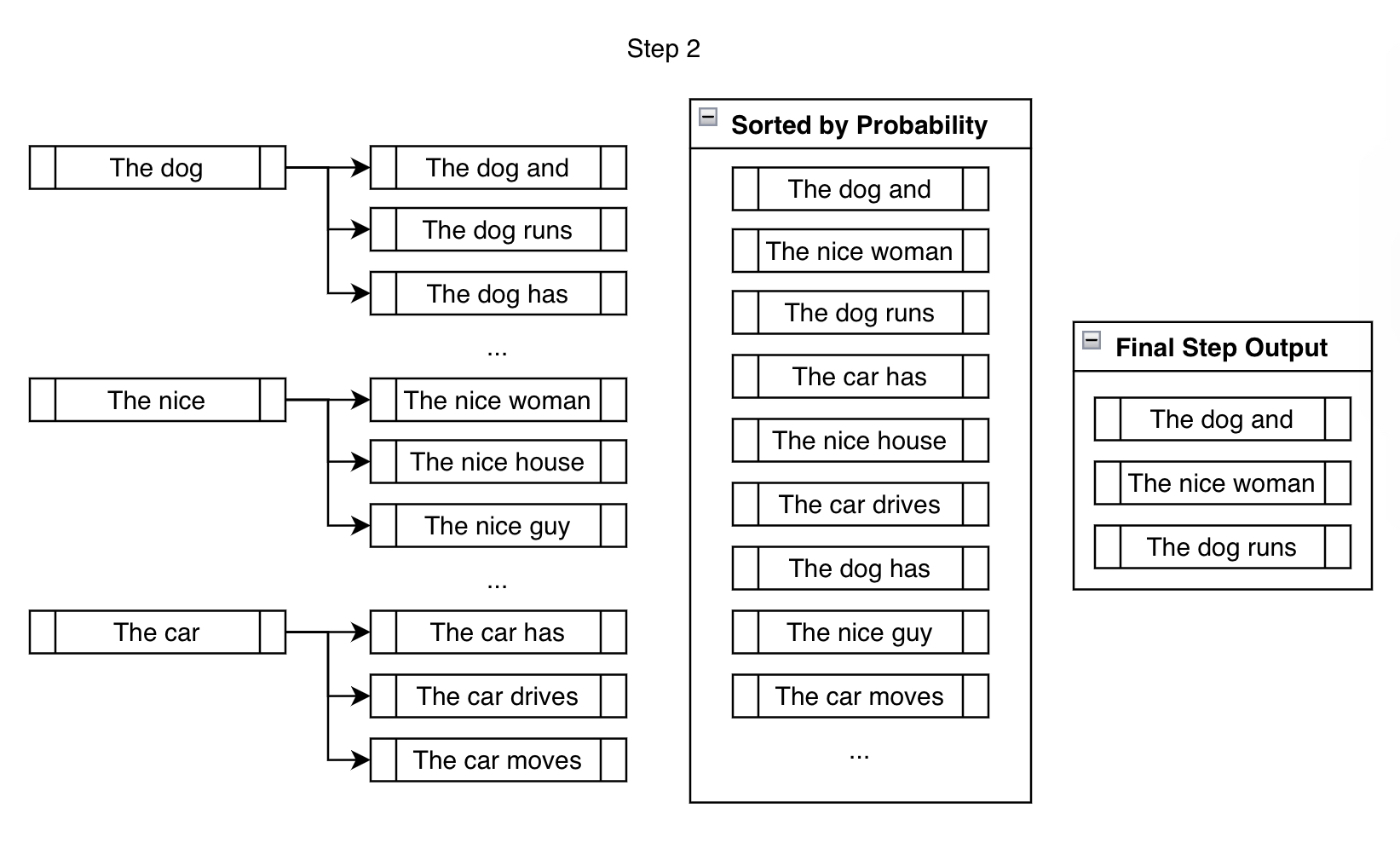
Though we end up considering significantly more than num_beams outputs, we reduce them down to num_beams at the end of the step. We can't just keep branching out, then the number of beams we'd have to keep track of would be beamsn \text{beams}^{n} beamsn for n n n steps, which becomes very large very quickly ( 10 10 10 beams after 10 10 10 steps is 10,000,000,000 10,000,000,000 10,000,000,000 beams!).
For the rest of the generation, we repeat the above step until the ending criteria has been met, like generating the <eos> token or reaching max_length, for example. Branch out, rank, reduce, and repeat.
Constrained Beam Search
Constrained beam search attempts to fulfill the constraints by injecting the desired tokens at every step of the generation.
Let's say that we're trying to force the phrase "is fast" in the generated output.
In the traditional beam search setting, we find the top k most probable next tokens at each branch and append them for consideration. In the constrained setting, we do the same but also append the tokens that will take us closer to fulfilling our constraints. Here's a demonstration:
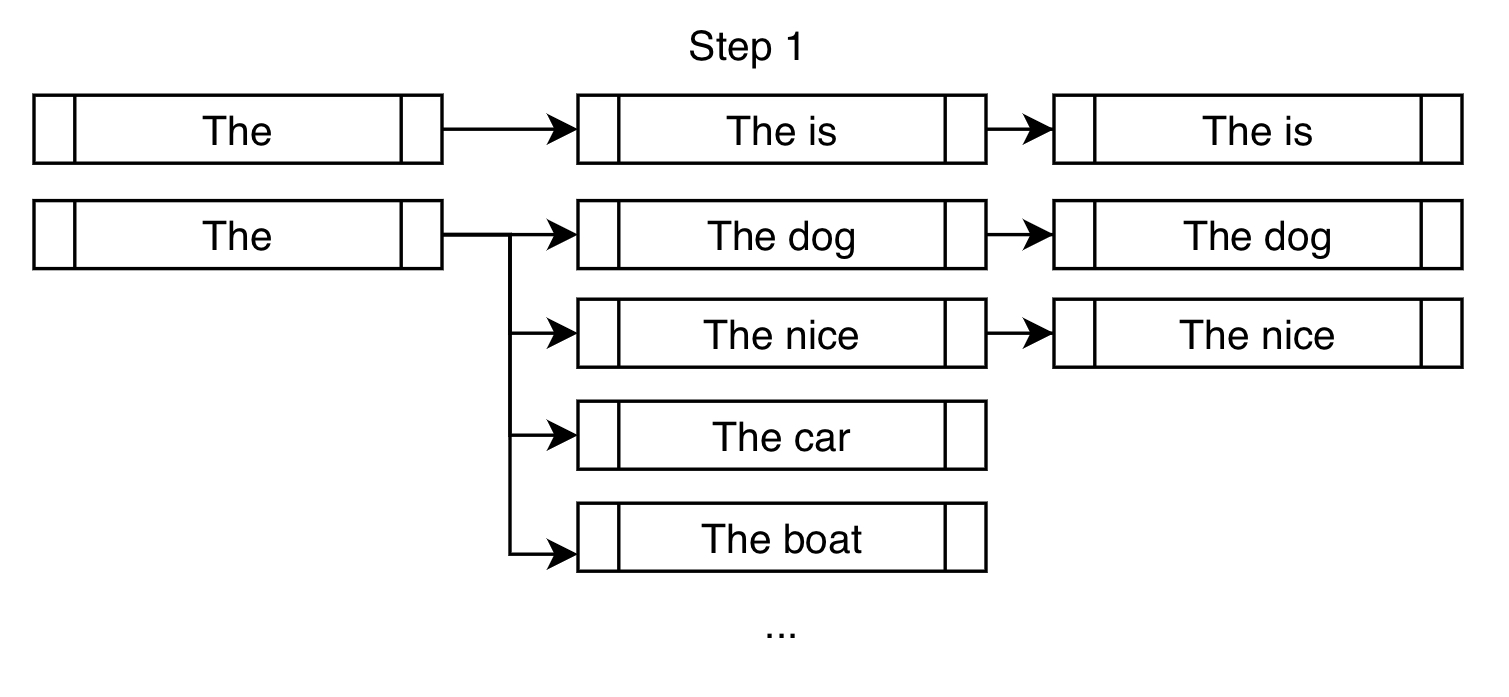
On top of the usual high-probability next tokens like "dog" and "nice", we force the token "is" in order to get us closer to fulfilling our constraint of "is fast".
For the next step, the branched-out candidates below are mostly the same as that of traditional beam search. But like the above example, constrained beam search adds onto the existing candidates by forcing the constraints at each new branch:
Banks
Before we talk about the next step, we need to think about the resulting undesirable behavior we can see in the above step.
The problem with naively just forcing the desired phrase "is fast" in the output is that, most of the time, you'd end up with nonsensical outputs like "The is fast" above. This is actually what makes this a nontrivial problem to solve. A deeper discussion about the complexities of solving this problem can be found in the original feature request issue that was raised in huggingface/transformers.
Banks solve this problem by creating a balance between fulfilling the constraints and creating sensible output.
Bank n n n refers to the list of beams that have made n n n steps progress in fulfilling the constraints. After sorting all the possible beams into their respective banks, we do a round-robin selection. With the above example, we'd select the most probable output from Bank 2, then most probable from Bank 1, one from Bank 0, the second most probable from Bank 2, the second most probable from Bank 1, and so forth. Since we're using num_beams=3, we just do the above process three times to end up with ["The is fast", "The dog is", "The dog and"].
This way, even though we're forcing the model to consider the branch where we've manually appended the desired token, we still keep track of other high-probable sequences that probably make more sense. Even though "The is fast" fulfills our constraint completely, it's not a very sensible phrase. Luckily, we have "The dog is" and "The dog and" to work with in future steps, which hopefully will lead to more sensible outputs later on.
This behavior is demonstrated in the third step of the above example:
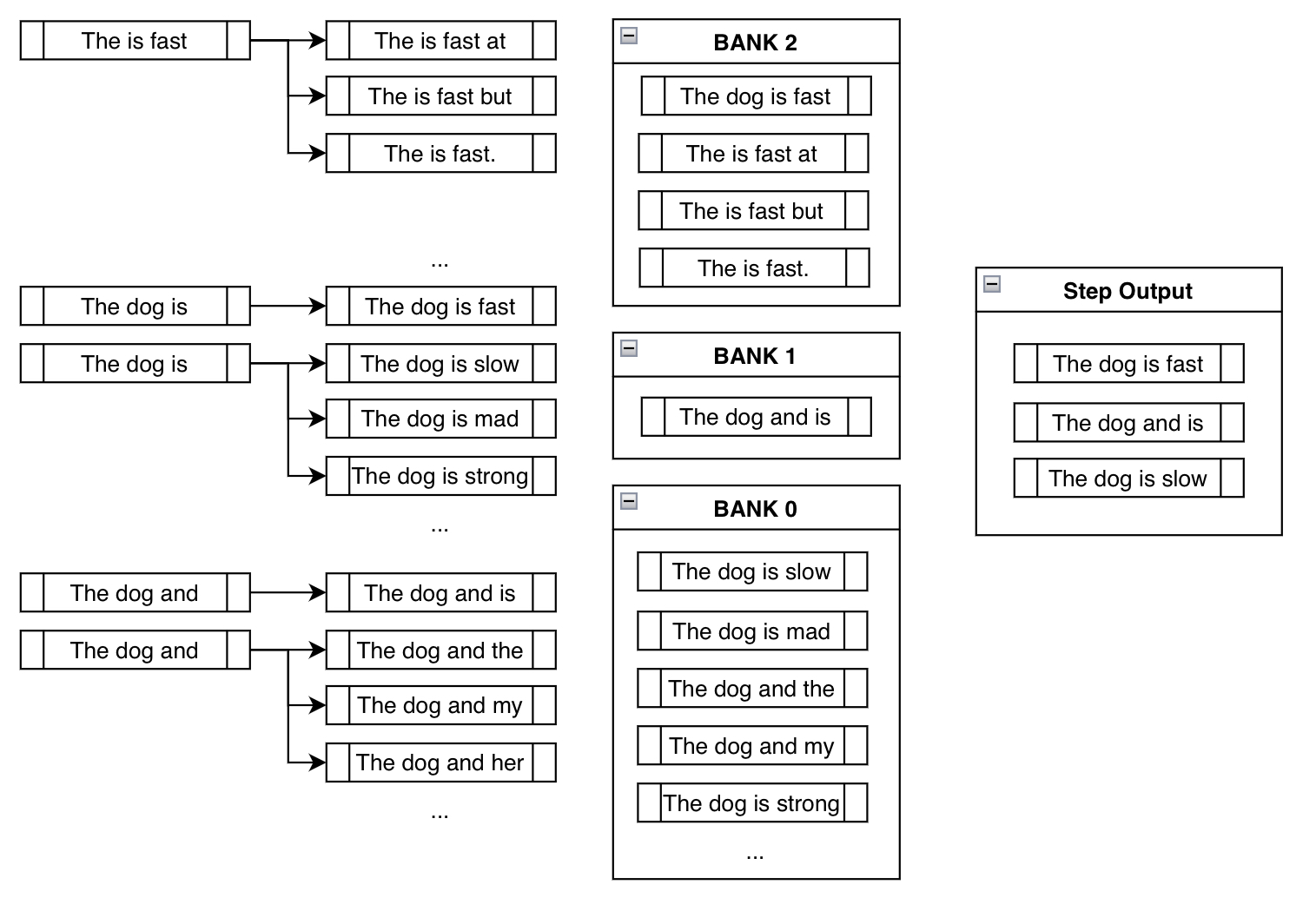
Notice how "The is fast" doesn't require any manual appending of constraint tokens since it's already fulfilled (i.e., already contains the phrase "is fast"). Also, notice how beams like "The dog is slow" or "The dog is mad" are actually in Bank 0, since, although it includes the token "is", it must restart from the beginning to generate "is fast". By appending something like "slow" after "is", it has effectively reset its progress.
And finally notice how we ended up at a sensible output that contains our constraint phrase: "The dog is fast"!
We were worried initially because blindly appending the desired tokens led to nonsensical phrases like "The is fast". However, using round-robin selection from banks, we implicitly ended up getting rid of nonsensical outputs in preference for the more sensible outputs.
More About Constraint Classes and Custom Constraints
The main takeaway from the explanation can be summarized as the following. At every step, we keep pestering the model to consider the tokens that fulfill our constraints, all the while keeping track of beams that don't, until we end up with reasonably high probability sequences that contain our desired phrases.
So a principled way to design this implementation was to represent each constraint as a Constraint object, whose purpose was to keep track of its progress and tell the beam search which tokens to generate next. Although we have provided the keyword argument force_words_ids for model.generate(), the following is what actually happens in the back-end:
from transformers import AutoTokenizer, AutoModelForSeq2SeqLM, PhrasalConstraint

tokenizer = AutoTokenizer.from_pretrained("t5-base")
model = AutoModelForSeq2SeqLM.from_pretrained("t5-base")

encoder_input_str = "translate English to German: How old are you?"

constraints = [
    PhrasalConstraint(
        tokenizer("Sie", add_special_tokens=False).input_ids
    )
]

input_ids = tokenizer(encoder_input_str, return_tensors="pt").input_ids

outputs = model.generate(
    input_ids,
    constraints=constraints,
    num_beams=10,
    num_return_sequences=1,
    no_repeat_ngram_size=1,
    remove_invalid_values=True,
)

print("Output:\n" + 100 * '-')
print(tokenizer.decode(outputs[0], skip_special_tokens=True))Output:
----------------------------------------------------------------------------------------------------
Wie alt sind Sie?You can define one yourself and input it into the constraints keyword argument to design your unique constraints. You just have to create a sub-class of the Constraint abstract interface class and follow its requirements. You can find more information in the definition of Constraint found here.
Some unique ideas (not yet implemented; maybe you can give it a try!) include constraints like OrderedConstraints, TemplateConstraints that may be added further down the line. Currently, the generation is fulfilled by including the sequences, wherever in the output. For example, a previous example had one sequence with scared -> screaming and the other with screamed -> scared. OrderedConstraints could allow the user to specify the order in which these constraints are fulfilled.
TemplateConstraints could allow for a more niche use of the feature, where the objective can be something like:
starting_text = "The woman"
template = ["the", "", "School of", "", "in"]

possible_outputs == [
   "The woman attended the Ross School of Business in Michigan.",
   "The woman was the administrator for the Harvard School of Business in MA."
]
or:
starting_text = "The woman"
template = ["the", "", "", "University", "", "in"]

possible_outputs == [
   "The woman attended the Carnegie Mellon University in Pittsburgh.",
]
impossible_outputs == [
  "The woman attended the Harvard University in MA."
]
or if the user does not care about the number of tokens that can go in between two words, then one can just use OrderedConstraint.
Conclusion
Constrained beam search gives us a flexible means to inject external knowledge and requirements into text generation. Previously, there was no easy way to tell the model to 1. include a list of sequences where 2. some of which are optional and some are not, such that 3. they're generated somewhere in the sequence at respective reasonable positions. Now, we can have full control over our generation with a mix of different subclasses of Constraint objects!
This new feature is based mainly on the following papers:
- Guided Open Vocabulary Image Captioning with Constrained Beam Search
- Fast Lexically Constrained Decoding with Dynamic Beam Allocation for Neural Machine Translation
- Improved Lexically Constrained Decoding for Translation and Monolingual Rewriting
- Guided Generation of Cause and Effect
Like the ones above, many new research papers are exploring ways of using external knowledge (e.g., KGs, KBs) to guide the outputs of large deep learning models. Hopefully, this constrained beam search feature becomes another effective way to achieve this purpose.
Thanks to everybody that gave guidance for this feature contribution: Patrick von Platen for being involved from the initial issue to the final PR, and Narsil Patry, for providing detailed feedback on the code.
Thumbnail of this post uses an icon with the attribution: Shorthand icons created by Freepik - Flaticon