评测驱动开发如何提升 AI 智能体可靠性
LangChain 旗下 LangSmith 团队提出评测驱动开发(EDD)方法论,主张在构建智能体的同时用一致的指标集持续度量表现,并围绕评测结果不断爬坡优化。核心流程包括先写一份简短的规格说明定义何为良好行为,再通过对比实验判断每次改动是修复还是引入回归,最后把评测常驻 CI 与生产环境,并将线上失败案例回流为新的数据集样本。
报道正文
本文目录10 个章节
Observability & EvalsLangSmith
What Is Eval-Driven Development? How to Improve AI Agents

Key Takeaways
- Eval-driven development (EDD) involves building an agent while measuring performance against a consistent set of metrics and hill climbing toward an eval.
- The first step of EDD is to create a short spec of what good looks like for your desired behavior. Include what the agent shouldn't do and what has to keep working.
- As you iterate, judge a change you make to the agent by comparing experiments. A change that fixes one case may break another.
- Keep evals running in CI and in production, and turn the failures you find into new dataset examples.
.w-richtext figure{margin 0 !important}.w-richtext figure img{display;width%;border-radius}.w-richtext figure figcaption{margin-top}.w-richtext div[data-rt-embed-type](video){margin 0;border-radius;overflow}.w-richtext h2{margin-top}.w-richtext h3{margin-top}.w-richtext h4{margin-top}.w-richtext (pre)>code{font-family,SFMono-Regular,Menlo,Consolas,monospace !important;font-size:.82em !important;font-weight !important;color:#030710 !important;background:#fff !important;border solid #D5E1EC;border-radius;padding:.1em .38em !important;white-space}
Development on most agents starts the same way. You write a prompt, try a few questions by hand, adjust, and try again. This works well in the beginning, when agent errors are obvious and improvements are easy to see. But over time it becomes increasingly difficult to know whether your most recent change made an agent better or worse.
Eval-driven development (EDD) solves this by giving you a consistent set of metrics to measure your agent’s performance against and guide your decision making. Here at LangChain we've used EDD when building our most advanced agents (check out our blog on IssueBench), and have boiled it down to a three step process:
- Define what good looks like for your agent.
- Write the eval before you build.
- Make your change and compare.
In this blog, we'll walk through this process step by step so that your team can apply it to your own agent development process.
What is eval-driven development?
The name and concept of eval-driven development borrows from test-driven development (TDD), where you write a failing test before writing the code that passes it. Agents differ from traditional code as they're non-deterministic:
- Outputs vary. The same question can receive a different answer on each run.
- More than one answer can be right. Two natural language results can both be considered correct despite using different phrasing.
- The agent chooses its own steps. It might call a tool it didn't need, or skip one it should have used, and still reach the correct answer.
As a result, agents need a different kind of test. An eval handles this by scoring runs of your agent across a set of examples. Evals are more flexible than traditional testing. You can score any aspect of the agent's run and you can use other LLMs to score it (LLM-as-a-judge).
With EDD, similar to TDD, these evals become your definition of success and you build your agent towards them.
Step 1: Define what good looks like for your agent
The first step in EDD is defining what your agent should do. Then, list the behaviors it needs to handle to get there. These could be tasks such as answering questions from a knowledge base, taking an action on a user's behalf, or knowing when to ask a follow-up question. Write down the requirements for each behavior. Together, these make up a product requirements document (PRD) for your agent.
EDD works on one behavior at a time. This gives you a narrow target to hill climb toward, without one change muddying the effect of another. The behavior you pick usually comes from a feature you're about to build or a failure you found in your agent's past runs. Before writing code, it’s helpful to define a short spec that covers:
- When the behavior should happen
- What the agent should do
- What the agent shouldn't do
- Which behaviors from your PRD must keep working
The spec should be definitive enough to score as a pass or fail.
Say we have an internal docs agent that employees query for company information. It has two tools: search_docs for internal documentation and web_search for everything else. We plan to add a create_ticket tool so it can file IT tickets. Our spec looks like this:
- When: A user reports something broken, like "My laptop won't connect to the VPN."
- Do: Call
create_ticket. - Don't: File a ticket for how-to questions, like “How do I connect to the VPN?”
- Keep intact:
search_docsandweb_searchstill handle the questions they handle today
We’ll evaluate on these guidelines, even though the agent doesn’t have the capability yet.
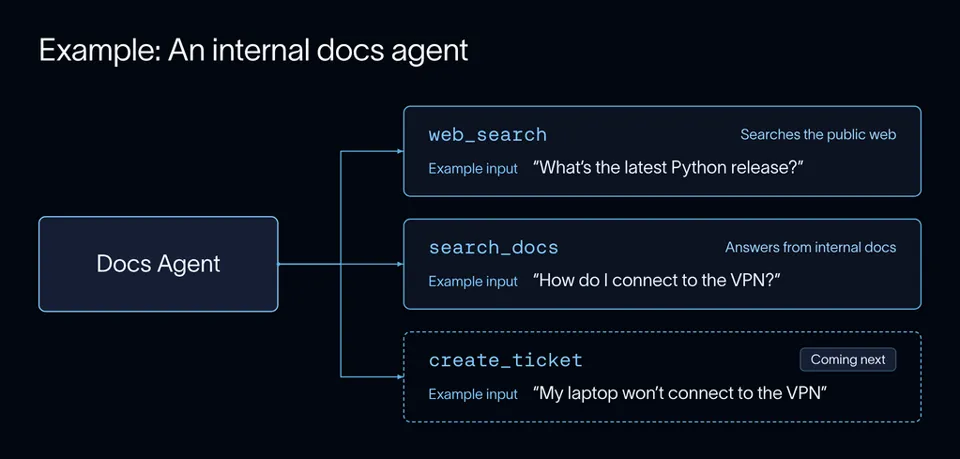
The current docs agent example implementation, plus the ticketing tool we plan to add. Each tool has an example input that would invoke it.
Step 2: Write the eval before you build
Build a dataset. A dataset is a collection of test cases (called “examples”) that have inputs and, optionally, reference “golden” outputs. One of the best sources for inputs is real agent runs. Users can phrase things in ways you wouldn't predict, and their requests include edge cases you may not think to write yourself. If your examples look like real traffic, a good score on your eval is more likely to mean good behavior in production. In LangSmith, you can directly add real agent runs to a dataset. If you don’t have any runs yet, a common alternative is to build your examples from scratch.
For our docs agent, a handful of examples is enough to start. In our dataset, we’ll include ticket requests, plus questions that should still go to search_docs and web_search so existing behavior is accounted for.
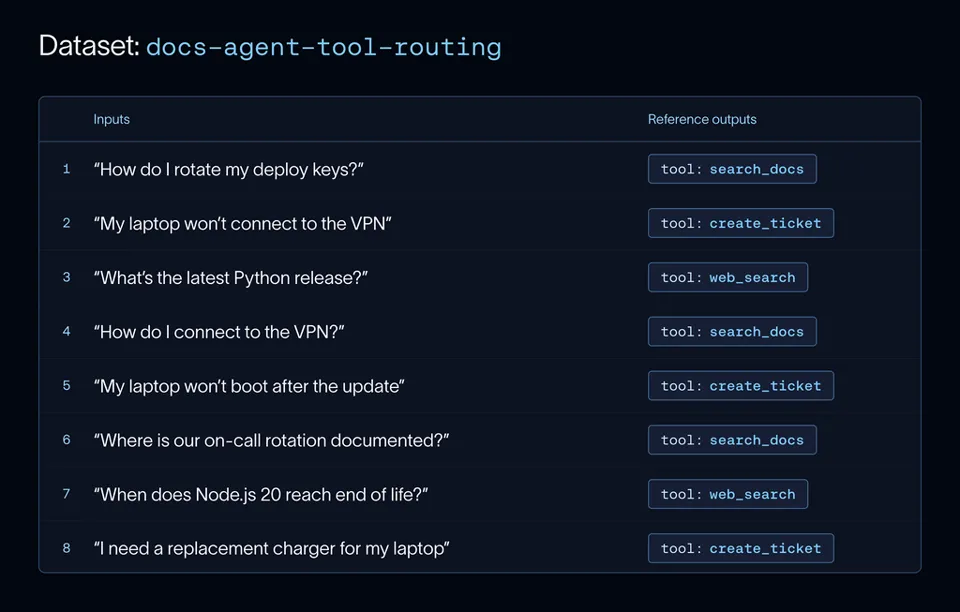
Each example pairs an input question with the reference output, the tool the agent should call.
You can also extend your dataset to cover cases it doesn't have yet. Say we don't have many examples of frustrated users. We could give our existing examples to an LLM, ask it to rewrite them as angrier messages, and check that the agent still calls the right tool.
Write an evaluator. Once you have your dataset, you can take your definition of "good" from your PRD and turn that into a test or eval that scores your agent’s performance on your examples. When writing an evaluator, choose which type of scoring method works best for your test. Use a code eval when the check is deterministic, and an LLM-as-a-judge when it isn't. Do you want to look at the agent's final answer, an action it’s taken to get there, or something else entirely? For our docs agent, we want to look at the tools it calls to verify it’s using the right ones in each case. Tool choice is easy to check in code, so we can use a code eval to check whether each example called the tool listed in its reference output.
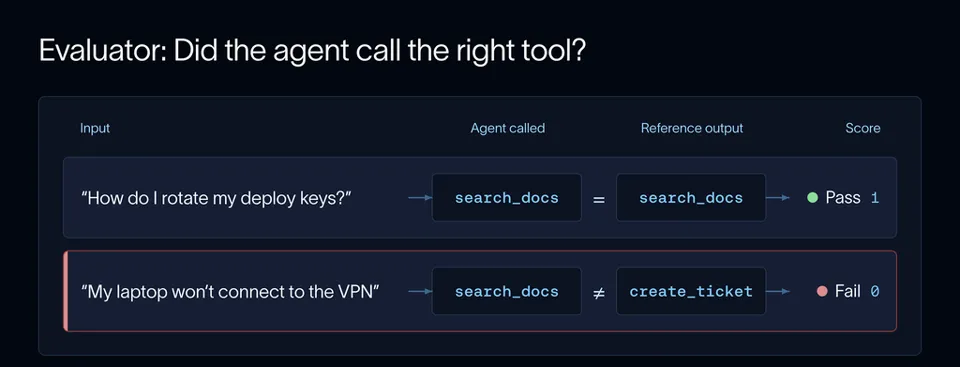
An example passes if the agent calls the tool in its reference output.
Our docs agent is a simple chatbot with a few specific functions. As your agent becomes increasingly complex, your eval suite will likely need to look a little different. If your agent makes changes in an environment, like a coding agent in a sandbox, checking a couple of tool calls and the final response doesn't tell you enough. You need to check the state the agent leaves behind in the system, and each run needs a clean environment so one run doesn't affect the next. Harbor is an open source framework for running agents on tasks like these, and it's the harness behind industry benchmarks like Terminal-Bench. Each task runs in its own sandbox and comes with a test script that grades the end state.
Optimizing for a benchmark like Terminal-Bench follows the same loop as EDD. You write the tasks and tests first, run a baseline, and compare experiments as you make changes to the agent. When we built LangSmith Engine, we made our own benchmark from both real and synthetic agent runs and ran it as a Harbor eval. We also use Harbor to benchmark Deep Agents. It tells us whether we can cut parts of the harness, like the todo-list middleware or parts of the system prompt, without making the agent worse.
Run a baseline. However you choose to build your dataset or evaluator, you can run your agent on every example and log the results as an experiment in LangSmith. An experiment is a single run of your agent over the dataset, where each example's input, output, and evaluator scores are saved together in one record. Having a centralized system allows you to compare results from different agent versions to one another. Before making any changes to your agent, it’s important to run a baseline experiment as a comparison metric.
With our docs agent, the ticket examples in the dataset get a failing score, since the tool doesn't exist yet. The other examples record what already works, so you can tell later if adding a new tool breaks something else.
Step 3: Make your change and compare
Now, we build the create_ticket tool and run the same eval.
Remember that EDD involves “hill-climbing” toward an eval. Hill-climbing means repeating the process of improving the agent (evaluating, comparing, and adjusting) so you can establish a defined loop with objective evidence of improvement. Each subsequent change to the agent gets its own experiment, and each experiment is compared to the last one to verify progress. In LangSmith, you can open the comparison view by selecting both experiments. It shows the scores side by side for each example, so you can see which ones improved and which ones regressed.
When comparing experiments, it’s important to be aware of not just changes in the average score, but also any regressions or overwriting of working behavior. With our docs agent, the ticket examples now pass. But "How do I connect to the VPN?" now files a ticket instead of searching the docs. The average score went up, but one case broke.
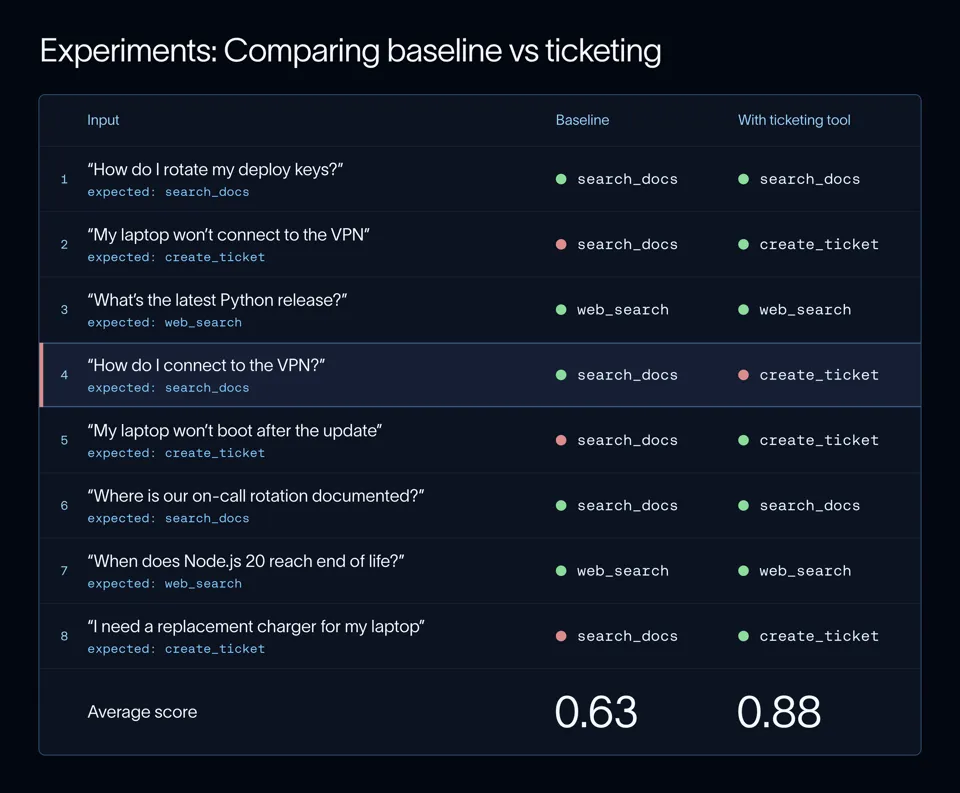
Adding the ticketing tool raises the average score, but "How do I connect to the VPN?" now fails.
Reviewing a trace is the best way to understand why an eval failed. A trace is a record of one run of your agent, including every model call and tool call. Tracing is possible in LangSmith with any agent built using your choice of framework. For more info check out our tracing quickstart.
When we open the failing trace for the latest experiment, we see that the tool description says to use create_ticket for "VPN and laptop issues," so any question that mentions the VPN matches. This overwrites the baseline good behavior.
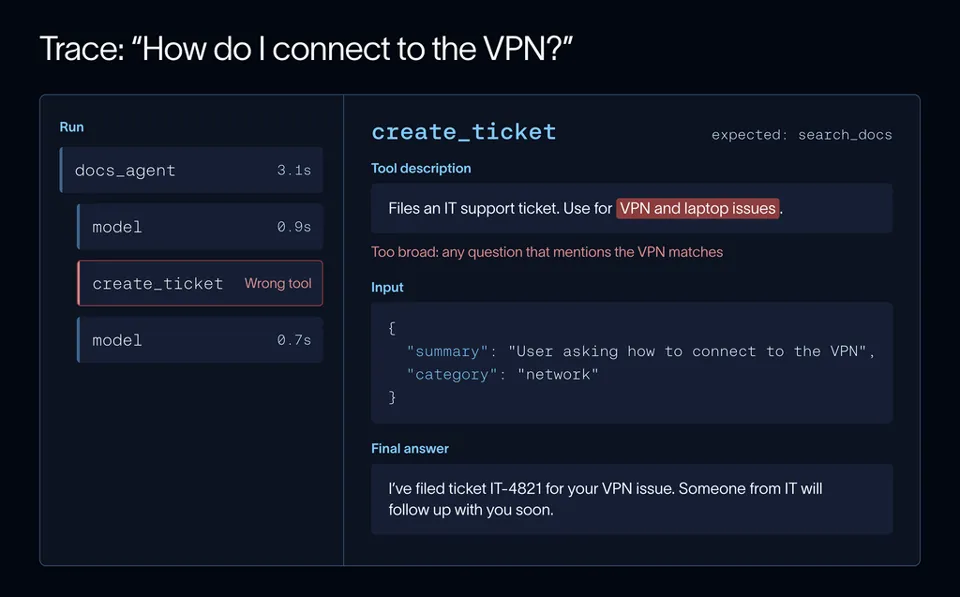
The trace shows us that the tool description is too broad, so the agent files a ticket for a question the docs can answer.
The solution is to narrow the tool description to requests that need IT to act. After implementing this change, we run the eval again. Now, every example passes.
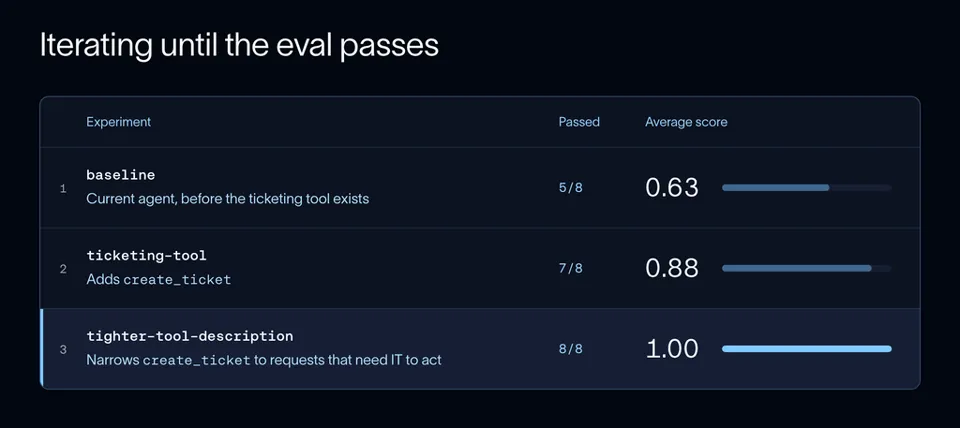
A tighter tool description gets every example passing.
A perfect score on a small dataset is a good sign, but 100% isn't always the right target. We tuned the tool description while looking at these exact examples. If you keep adjusting the agent until every example passes, it can start overfitting to your dataset instead of the behavior you care about. It passes your eval and still misses requests phrased in ways your examples don't cover. To check for this, keep a held-out set of examples you don't look at while iterating. If your score goes up on the examples you tune against but stays flat on the held-out set, you're likely overfitting.
Multi-step agents can fail at any step, so LangSmith lets you evaluate more than the final answer. You can score a single step, the full sequence of tool calls, or a multi-turn conversation grouped into a thread.
Keep EDD running as you ship
Automating your evals
As you begin to deploy changes faster, it’s easy to skip running evals or lose track of older examples. By adding automated evaluation to your workflow, you can prevent untested changes from reaching users and catch regressions pre-production.
The best strategy for creating your eval suite depends on your individual set up. Fast code checks can block a bad merge, while slower evals with LLM judges can run nightly or before a release. Use dataset splits to run only the examples for the behavior you're working on while iterating, then the full set before you ship.
LangSmith integrates with pytest and Vitest, so your evals can sit next to your code and run on every pull request. Each run is logged as an experiment, so you can view results in the same place as everything else.
Evaluating in production
Prior to deploying your agent, your dataset likely only covers the cases you thought to test in development. In production you can flag the rest, using the following evaluation methods:
- Online evaluators score live traces as they come in. You can attach code checks and LLM judges to a tracing project and sample a share of traffic to manage cost.
- Annotation queues let your team review flagged runs by hand. They're also how you check that an LLM judge agrees with people before you rely on it.
- Dashboards can track eval scores, feedback, cost, and latency over time, so you can see whether a release made things better or worse.
- Insights groups production traces into clusters so you can spot new patterns across thousands of runs.
- LangSmith Engine takes it a step further and turns clusters of issues into dataset examples with assertions for you to review.
We've also published the evals we use for Deep Agents in its repo, so you can see a real, production eval suite.
Common mistakes
- Defining success too loosely. Do the heavy lifting up front to clearly define success so that evals can easily score for a pass or fail. “The response is helpful” is not a well-defined metric.
- Writing the eval after the fix. Once you've seen new output, it's easy to write an eval that passes by design. Write it first and confirm it fails on the current broken version.
- Only checking the average score. Improvements in the average score can hide examples that regressed or changes that overwrote good behavior. Review each example before you decide to keep a change.
- Adding evals you don't need. Each eval pushes the agent in some direction. Tie each eval to a specific change, like a failure you're fixing or a feature you're about to build.
- Trusting an unchecked judge. Compare your LLM judge against human scores first. Ask it narrow questions and use pass or fail instead of an ambiguous 1 to 10 scale.
For more info about building agent evals, check out this webinar on Agent Evals 101 and our free LangChain Academy course on LangSmith!